Knowledge Silos in Engineering Teams: 5 Solutions That Work
Knowledge Silos in Engineering Teams: 5 Solutions That Work
Knowledge silos are holding your team back. When critical information is locked in one person's head or scattered across tools, it creates single points of failure, slows projects, and frustrates engineers. The result? Delayed work, wasted time, and a "bus factor" of one - where the absence of key individuals can bring everything to a halt.
Here’s the problem in numbers:
- 45% of developers encounter silos multiple times a week.
- Large companies lose $47 million annually due to siloed knowledge.
- 66% of developers face silos weekly, draining productivity.
This article outlines 5 practical solutions to break down silos:
- Shared Memory Systems: Centralize knowledge across tools for easy access.
- Pair Programming & Rotations: Spread expertise through collaborative coding and role changes.
- Architectural Decision Records (ADRs): Document key decisions for long-term clarity.
- Mentorship & Teach-Backs: Use coaching and active learning to transfer knowledge.
- AI-Powered Active Memory: Automate context delivery and reduce repetitive work.
These strategies can improve productivity by up to 70%, cut onboarding time, and eliminate bottlenecks caused by siloed knowledge. Start small by identifying high-risk areas and implementing one or two solutions tailored to your team's needs.
Breaking down knowledge silos between engineering teams
sbb-itb-1218984
What Are Knowledge Silos and Why Do They Hurt Teams?
Knowledge silos occur when critical information is confined to specific individuals or teams, making it inaccessible to the rest of the organization. In engineering teams, this often shows up in predictable ways: one developer might dominate commits for a key service, pull requests in certain areas get delayed because only one person has the necessary expertise, or teams develop an "Ask Bob" culture, where a single expert becomes the go-to for information instead of using a shared knowledge base.
The impact of silos goes beyond inconvenience. When essential context is scattered across tools like Slack, Jira, and email, teams lose the ability to connect the dots between systems. Research shows that 66% of developers and 75% of managers encounter a knowledge silo at least weekly. This fragmentation can stall projects when key people are unavailable, slow down onboarding due to undocumented decisions, and make it harder to shift priorities because transferring knowledge becomes too time-intensive.
The financial cost is also steep. Knowledge workers spend an average of 2.0 hours per week recreating information that already exists and 1.7 hours per week answering the same questions or providing duplicate updates. In fact, 56% of workers admit they often rely on colleagues or meetings to find critical information. This not only drains productivity but also diverts attention from solving new challenges.
How Knowledge Silos Affect Engineering Teams
For engineering teams, silos create single points of failure, making planning and forecasting unreliable. If only one or two people hold critical knowledge, work slows - or stops entirely - when they’re unavailable. This forces teams to adopt a cautious approach, where developers stick to their own areas to avoid the slow, cumbersome review process required for unfamiliar code. Over time, this limits curiosity and cross-functional learning.
Onboarding is another area that suffers. New hires can’t rely solely on documentation or code to understand why certain technical decisions were made because much of that reasoning exists as "tribal knowledge" - informal, undocumented expertise. This creates a frustrating cycle: over 50% of developers say they’d consider leaving a job that doesn’t offer enough opportunities for learning and growth.
Without shared knowledge, engineers often reinvent the wheel, solving problems that have already been addressed or working off incorrect assumptions. This leads to wasted time and unnecessary rework. A great example of addressing this issue comes from Code Climate, which in February 2022 introduced a system for logging key decisions and documenting new projects. This effort boosted their engineering team’s throughput by nearly 70%, as it cut down on redundant work and misinformed approaches.
These challenges become even more pronounced in AI-driven teams, where the complexity of knowledge management reaches new levels.
Why AI-Driven Teams Face Bigger Challenges
AI-driven teams face unique hurdles. Unlike traditional software teams that primarily deal with code and APIs, AI/ML teams must manage a broader range of information, including codebases, tickets, data lineage, and the reasoning behind models. The rapid pace of iteration in AI work generates new information faster than it can be organized, leading to what some call "knowledge chaos".
This fragmentation is worse in AI teams because they often rely on numerous disconnected tools and platforms. For instance, one sub-team might use Prometheus for metrics while another uses Wavefront, making cross-team analytics nearly impossible. This not only creates data silos in addition to knowledge silos but also disrupts the flow of information needed for smart decision-making.
Documentation, while helpful in theory, often fails AI teams. The fast-moving nature of AI/ML development means documentation can become outdated almost immediately. Additionally, AI work heavily depends on undocumented heuristics - like why a specific model pattern was chosen or how to handle unique failure modes (e.g., Postgres CPU spikes after failover). When key experts aren’t available, this lack of documentation becomes a major risk. Despite these challenges, 54% of CEOs recognize that AI improves workplace efficiency by enabling data-driven insights.
These obstacles underscore the need for targeted solutions that break down silos and bring agility back to teams. By addressing these issues, engineering teams can create systems that promote shared understanding and better collaboration.
Solution 1: Implement Shared Memory Systems
One of the most effective ways to break down knowledge silos is by setting up a centralized, auditable knowledge base that keeps information synchronized across all your tools. Systems like Knowledge Plane bring together code, documentation, tickets, and chats into a single, continuously updated repository. This ensures that every update is instantly available to your team and AI agents.
The benefits are clear. Research indicates that maintaining high-quality, up-to-date documentation can boost developer productivity by 50%. For example, when Code Climate introduced intentional knowledge-sharing practices - such as logging key decisions and documenting workflows - their engineering team saw a nearly 70% increase in throughput. This kind of improvement stems from reducing the time developers waste searching for information or recreating existing solutions. Let’s dive into how shared memory systems work and the advantages they bring.
How Shared Memory Systems Work
Unlike traditional tools that silo information, shared memory systems extract key details and relationships from various sources (e.g., "Service A depends on Service B") and organize them into a connected graph. This setup allows AI agents to navigate these relationships and understand the context, similar to how a senior team member would.
Knowledge Plane, for instance, uses automated "Skills" - background processes that continuously update the knowledge base by reconciling data from sources like GitHub, Google Docs, or Slack. These Skills detect discrepancies between the original source and the stored information, ensuring the knowledge base stays accurate. Each piece of information is tagged with a specific source, owner, and timestamp, making it easy to trace its origin and verify its relevance.
Benefits of Using Knowledge Plane
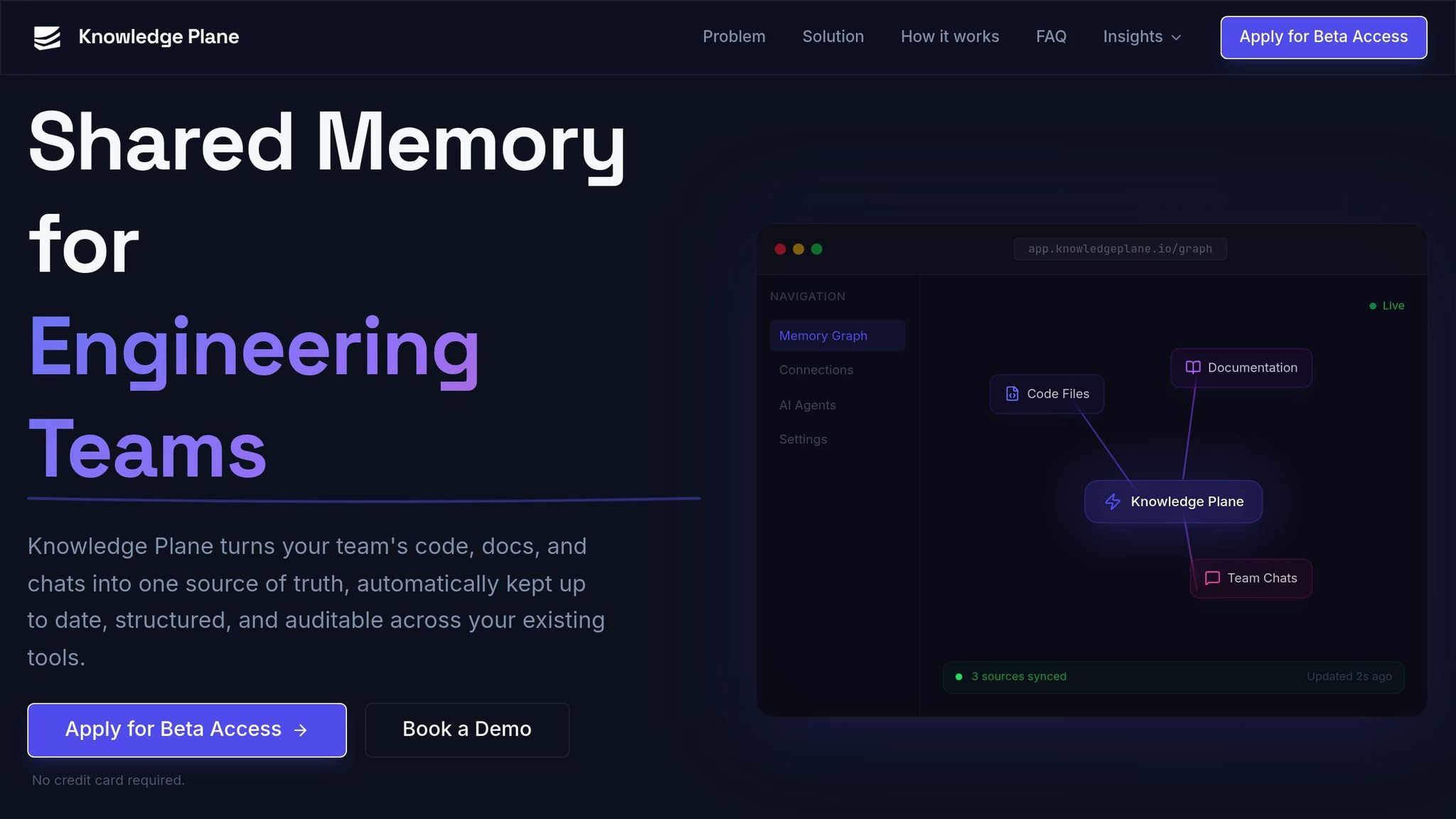
Knowledge Plane tackles core challenges by mapping dependencies across your entire stack. For example, if someone asks, "Which services will be impacted if we change this API?" the system can provide answers based on its relationship graph rather than relying on basic keyword searches. It also integrates with AI assistants through open standards, ensuring smooth access to shared memory.
Security and compliance are built into the system. It offers isolated workspaces secured by scoped API keys, keeping team knowledge compartmentalized and logging every query for accountability. Teams can choose between managed cloud deployments for quick setup or self-hosted options to meet strict data sovereignty needs. Unlike traditional wikis that quickly become outdated, Knowledge Plane's automated synchronization ensures the knowledge base evolves alongside your codebase.
"Every piece of knowledge has a source, owner, and timestamp. You can trace exactly where the AI got its information." - Knowledge Plane
This level of traceability is crucial for production-ready work. Before releasing AI-assisted code, developers can confirm that the AI's logic is grounded in the latest architectural decisions and approved sources, rather than outdated documentation.
Example Use Cases
Shared memory systems shine when tackling common challenges faced by engineering teams. For onboarding, new hires can ask questions and receive answers complete with references to original decision documents, architectural decision records (ADRs), or code comments - minimizing interruptions to senior developers. During incidents, on-call engineers can quickly identify affected services and their owners without wading through outdated documentation.
These systems also prevent duplicated fixes by capturing the context around past bug resolutions. When a similar issue arises months later, the shared memory surfaces the previous solution and its reasoning, saving time and effort. The graph structure enables the system to answer complex questions like "What other teams depend on this service?" or "Who decided to use this database?" - all without requiring developers to manually maintain intricate documentation hierarchies. By streamlining these processes, shared memory systems effectively eliminate knowledge silos and provide teams with the full context they need to work efficiently.
Solution 2: Use Structured Pair Programming and Rotations
Breaking down knowledge silos isn't just about having the right tools; it's about fostering intentional human collaboration. While centralized systems lay the groundwork, practices like pair programming and team rotations ensure that knowledge flows naturally between team members. These methods promote real-time knowledge sharing, reducing delays caused by documentation gaps and ensuring everyone stays in the loop.
Between 2022 and 2023, Thoughtworks consultants Gabriel Robaina and Kieran Murphy conducted an experiment with three distributed engineering teams in the US and Brazil. These teams transitioned from infrequent rotations - sometimes as rare as once a month - to daily pair rotations for two weeks. The results were striking: teams adopted a rotation schedule of every 2–3 days permanently. One team even reported they no longer relied on specific individuals to resolve production issues because the context had already been shared across the group.
"Knowledge silos are impossible to maintain" - Thoughtworks experiment
Pair Programming for Knowledge Exchange
Pair programming is a hands-on way to share knowledge in real time. In this setup, one person writes the code (the Driver), while the other reviews and guides (the Navigator). This dynamic not only catches mistakes early but also ensures that at least two people understand the reasoning behind every decision. For onboarding or when pairing an experienced developer with a novice, "Strong-Style" pairing is particularly effective: the expert takes on the Navigator role, guiding the novice (the Driver). This approach forces the learner to actively participate, rather than passively observe.
Given the intense focus required for pair programming, it's important to manage mental energy. The Pomodoro Technique - working in 25-minute intervals followed by 5-minute breaks - can help maintain productivity. Frequent role-switching during these sessions keeps both participants engaged. To ensure continuity, pairs should document their progress at the end of each day. A quick note on the task card summarizing decisions and next steps allows the next pair to pick up seamlessly without losing context.
Team Rotations to Broaden Expertise
While pair programming fosters immediate knowledge transfer, team rotations help spread expertise across a broader group. Pairing two people for too long can inadvertently create silos within that duo. To counter this, rotate pairings regularly. One effective approach is the "anchor" system: one person stays with a task for continuity while the other rotates. To avoid new silos, even anchors should switch after no more than two days. A pairing matrix can help manage rotations and prevent team members from gravitating toward familiar pairings.
Rotating responsibilities can also build cross-team expertise. For example, assigning a rotating "bug czar" or on-call shifts pushes developers to quickly familiarize themselves with systems they haven’t worked on before. As Edvaldo Freitas from Kodus explains:
"The problem isn't specialization itself... The problem is when they are the only one" - Edvaldo Freitas, Kodus
Solution 3: Create Architectural Decision Records and Dedicated Channels
Real-time collaboration is great for immediate problem-solving, but what about decisions made months ago? Or when a new hire needs to understand why a particular approach was chosen? Without a lasting record, the reasoning behind key technical choices can vanish, living only in the memories of team members - who might leave or simply forget.
This is where Architectural Decision Records (ADRs) come in. ADRs document the why behind critical technical decisions. Each ADR focuses on a single decision, detailing the context, options considered, trade-offs, and expected outcomes. These records are especially valuable for decisions that are expensive to undo, like selecting a database, transitioning to microservices, or adopting gRPC over REST.
Architectural Decision Records (ADRs) for Traceability
ADRs address what Ilya Hardzeenka from the Software Architecture Guild calls "decision amnesia":
"ADRs exist to fight decision amnesia. They capture not just what you chose, but why - the context, constraints, trade-offs, and expected consequences - so future teams do not have to reverse-engineer intent from code and rumors."
A great example of ADRs in action comes from the IBM Watson Discovery Service (WIRE) team. Between 2016 and 2018, Tech Lead Michael Keeling and engineer Joe Runde led a team of nine engineers who created over 80 ADRs across two dozen repositories. These records proved invaluable. When a new team member, Annie Latsko, joined and reviewed the ADRs for the "Training Agent" component, she was able to contribute effectively the very next day. The team also noticed a pattern: their most problematic microservices - responsible for 90% of day-to-day issues - had only two ADRs, while their stable counterparts of the same age had nearly a dozen.
To make ADRs accessible, store them as Markdown files in a /docs/adr folder within the same Git repository as the relevant code. This keeps documentation close to the work and allows teams to review architectural changes through the same pull request process used for code reviews. Each ADR should follow a clear structure: Title, Status (e.g., Proposed, Accepted, Superseded), Context, Decision, and Consequences. When decisions are updated, mark the old ADR as "superseded" and link it to the new one, ensuring an unbroken audit trail.
While ADRs provide a static record, ongoing discussions in dedicated channels keep the context alive and actionable.
Domain-Specific Channels for Collaboration
ADRs document the what and why, but teams also need spaces for active discussions. Domain-specific channels - such as #backend-decisions or #ai-research on platforms like Slack or Microsoft Teams - serve as hubs for sharing findings, debating trade-offs, and resolving questions. These channels reduce context-switching and make it easier to locate and reference conversations later.
For efficient ADR reviews, consider using a "readout" meeting style. Participants spend the first 10–15 minutes silently reading the ADR and leaving comments before diving into a discussion. This approach ensures everyone is prepared and minimizes repetitive debates. Time-box these meetings to 30–45 minutes and limit attendance to fewer than 10 people. As Michael Keeling from IBM pointed out:
"Writing an ADR is cheap. It takes maybe 10 minutes to write up a decision record once a decision had been made. The benefits are so huge, it just seems like a no brainer."
Solution 4: Launch Mentorship Programs and Teach-Back Sessions
While tools and documentation play a big role in breaking down knowledge silos, human-driven strategies add an irreplaceable layer of depth to knowledge transfer.
Sure, ADRs and dedicated communication channels help preserve decisions, but they can’t replicate the value of a senior engineer walking a junior developer through a complex refactor. This kind of guidance - explaining not just what to do but why past approaches didn’t work - creates opportunities for deeper learning. Mentorship programs pair experienced team members with newcomers to ensure that critical context is shared. These programs complement the technical and process-based strategies discussed earlier, adding a much-needed human element.
Here’s the impact: formal mentorship programs have been shown to improve code quality by 25%, speed up feature delivery by 30%, and increase retention rates by 40%. But for mentorship to work, it has to be intentional. Allocating 10–20% of senior developers’ time to coaching and tying these efforts to career advancement frameworks ensures that mentorship becomes a priority, not an afterthought.
Structured Mentorship with Code Reviews
Code reviews often get reduced to a checklist for approval, but they can be so much more when paired with mentorship. They’re an opportunity for real-time learning. As Greg Foster, a software engineer at Graphite, puts it:
"Code reviews create a unique learning environment that combines real-world application with immediate feedback"
In this setting, senior engineers don’t just point out mistakes - they explain architectural choices, discuss trade-offs, and share insights that aren’t always documented. This method creates a safe space for learning, catching potential issues early while easing the pressure to perform perfectly. Dan Futrell, Senior Engineering Manager at SonderMind, highlights the benefits of pair programming:
"A practice that encourages mentorship and knowledge-sharing that my team follows is pair programming... In my experience, teams deliver higher quality code with less production defects"
The cost of a structured mentor-mentee pairing? Typically $1,200 to $2,400 per month. But the return on this investment is seen in significant productivity and quality improvements.
Teach-Back Sessions for Reinforcement
Mentorship is powerful, but learning becomes even more effective when the roles are flipped - when learners become teachers.
This is where teach-back sessions shine. The idea is simple: after mastering a system or solving a tough bug, the learner shares their knowledge. Whether it’s leading a brown bag session or creating a beginner’s guide, teaching reinforces what they’ve learned. Edvaldo Freitas from Kodus explains:
"One of the best ways to solidify learning is to teach the material to someone else"
Google has scaled this concept impressively through its Googler-to-Googler (g2g) network, which features over 6,000 volunteer facilitators. These facilitators conduct 80% of all tracked training sessions at the company. What’s more, introducing 1:1 coaching for these facilitators boosted student satisfaction scores by 0.3 points on a 5.0 scale. The most effective sessions include group discussions, hands-on activities, and demo teach-ins to ensure clarity. The result? Beginner-friendly documentation created by people who’ve just consolidated their own understanding, making the material accessible and practical for others.
Solution 5: Use AI-Powered Active Memory Integration
Earlier solutions emphasized collaboration and static documentation, but AI-powered active memory integration takes it a step further by automating how context is delivered. These systems track code, tickets, and conversations in real time, surfacing the exact information teams need when they need it most. On average, engineering teams lose about 23% of their time searching for information that already exists, which can cost a 50-person team approximately $2.3 million annually in lost productivity.
AI for Traceable Workflows
Unlike traditional documentation tools that rely on manual updates and often remain disconnected from the codebase, AI-powered systems work continuously. They gather data from platforms like GitHub, Slack, and Jira to create a dynamic knowledge graph. This graph links code, tickets, and conversations together, making it easy to trace decisions. For example, if a developer asks, "Why was this architecture chosen?" the system can instantly provide precise references, including file paths, line numbers, branch names, and release versions.
This level of traceability not only reduces errors but also fosters trust within the team. One engineering team that adopted Knowledge Plane’s active memory integration reported saving over 5 hours per developer per week by unifying technical knowledge across GitHub and Slack.
Graph Memory for Ownership and Dependencies
Graph-based memory systems go beyond simple traceability. They map relationships within the codebase, identifying details like which commit implements a specific feature, who owns a particular service, and how changes might ripple across other systems. This clarity is invaluable as teams grow, helping to manage ownership, dependencies, and the potential impact of modifications.
By combining graph memory with vector search capabilities, these systems enable AI agents to reason about code ownership and dependencies. Automated updates ensure that the context remains current, dramatically improving efficiency. For instance, integrating a searchable knowledge graph can reduce repetitive technical questions by 80% and shorten the onboarding process for new developers by a factor of three. This means new hires can contribute meaningful pull requests in under a week.
This approach views context as a critical part of the infrastructure. Louis Landry, CTO at Teradata, highlights this shift perfectly:
"The shift underway is from asking 'How do I prompt this AI?' to 'How do I build systems that continuously supply agents with the right operational context?'"
Comparing Solution Implementation: Time Investment vs. Productivity Gains
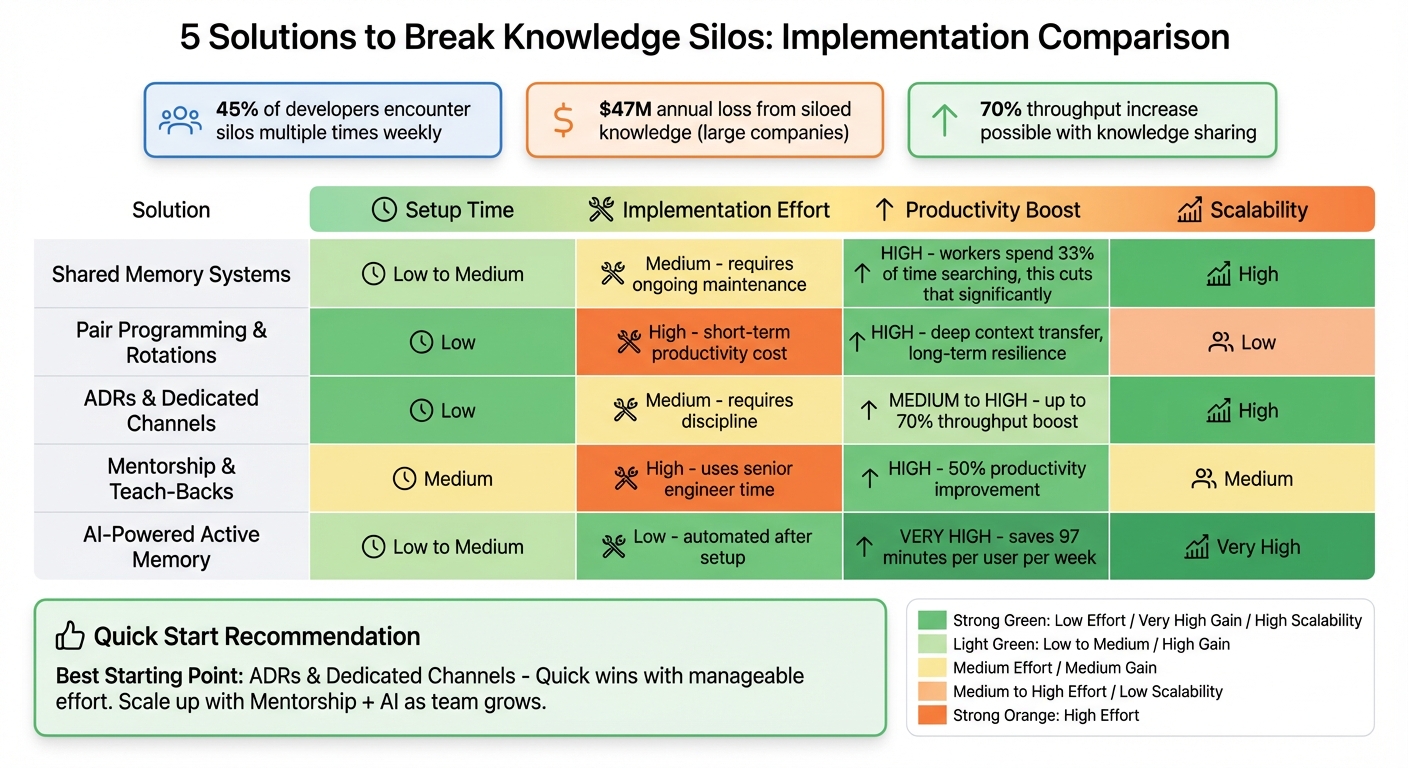
5 Solutions to Break Knowledge Silos: Implementation Effort vs Productivity Impact
Choosing the right solution depends on your team's size, current bottlenecks, and how quickly you need results. Some methods yield quick benefits with minimal setup, while others require more upfront effort but deliver long-term advantages through automation and scalability. The key is balancing what each solution demands with the productivity it provides. Here's a summary of the trade-offs:
Comparison Table
| Solution | Estimated Setup Time | Implementation Effort | Productivity Boost | Scalability |
|---|---|---|---|---|
| Shared Memory Systems | Low to Medium | Medium (requires ongoing maintenance) | High (can cut down search time significantly, as workers spend 33% of their time searching) | High |
| Pair Programming & Rotations | Low | High (short-term productivity cost) | High (enables deep context transfer and builds long-term resilience) | Low |
| ADRs & Dedicated Channels | Low | Medium (requires discipline) | Medium to High (up to 70% throughput boost) | High |
| Mentorship & Teach-Backs | Medium | High (uses senior engineer time) | High (can improve productivity by 50%) | Medium |
| AI-Powered Active Memory | Low to Medium | Low (automated after setup) | Very High (saves 97 minutes per user per week) | Very High |
This table highlights how different solutions align with varying levels of effort and long-term scalability, offering a clearer picture of their strengths and trade-offs.
Each approach has its own appeal. Shared memory systems, for example, are highly effective when properly maintained. However, without consistent updates, documentation can quickly become outdated. Pair programming and rotations, on the other hand, excel at transferring knowledge deeply within teams. While they come with an initial drop in productivity, the long-term benefits are undeniable. As Edvaldo Freitas from Kodus explains:
"The short-term velocity hit is a worthwhile investment in long-term team resilience."
This method tends to work particularly well for smaller teams where close collaboration is feasible.
ADRs (Architectural Decision Records) and dedicated channels streamline decision documentation, making it easier to scale without significant extra effort. Meanwhile, mentorship programs require a substantial time commitment from senior engineers but can lead to a 50% productivity boost and up to 70% increased throughput.
For teams leveraging technology, AI-powered active memory tools automate context delivery and reduce repetitive work. With an average savings of 97 minutes per week per user, this solution offers both efficiency and scalability with minimal ongoing effort.
When synthesizing these insights, starting with ADRs and dedicated channels is an excellent way to achieve quick wins with manageable effort. As your team expands, integrating mentorship programs and AI-powered tools can multiply these gains, addressing both human and automated aspects of productivity. Tailor your approach based on your team's specific needs and challenges, blending these strategies as your team evolves.
Conclusion: Taking the Next Steps to Break Knowledge Silos
Breaking down knowledge silos starts with identifying your team's key bottlenecks and consistently addressing them. Tools like shared memory systems help centralize crucial information, cutting down on repetitive work. Strategies such as pair programming and team rotations naturally spread knowledge while increasing your team's Bus Factor. Decision records (ADRs) and dedicated communication channels ensure the reasoning behind decisions remains accessible, even through staff changes. Mentorship programs and teach-back sessions create an environment where knowledge sharing becomes second nature. Meanwhile, AI-powered memory systems turn documentation into dynamic, searchable resources that grow with your team.
Begin by pinpointing your riskiest vulnerabilities - those critical "if X breaks, who knows how to fix it?" scenarios. Assign both primary and backup owners to these areas immediately. Then, select one or two targeted solutions to address your team's most urgent needs. As Hillary Nussbaum from Code Climate aptly notes:
"Knowledge silos are more than just a frustration or an inconvenience - they're a serious threat to productivity."
Research backs this up: teams that prioritize knowledge sharing experience nearly 70% higher throughput and up to a 50% increase in productivity. These strategies yield tangible improvements in performance and collaboration.
To sustain these benefits, integrate your chosen solutions into everyday workflows. For example, make updating documentation a required part of completing tasks (your "Definition of Done"). Introduce rotating roles, like "on-call" or "bug czar", to ensure team members gain exposure to various systems. Track your progress using metrics such as pull request reviewer distribution and the team's capacity to handle incidents.
The question isn't if you should tackle knowledge silos - it's how soon you can start. Begin small. Test these methods with one team, prove their value, and then expand these practices across your organization. Taking action now will lead to lasting improvements in productivity and resilience.
FAQs
How do I measure our team’s bus factor?
To gauge your team’s bus factor, start by identifying how many team members are absolutely essential to the project’s progress. In other words, consider who the project would struggle without if they left or became unavailable.
Here’s how you can do it:
- Analyze Knowledge Distribution: Pinpoint where expertise is concentrated and who holds critical project knowledge.
- Review Contribution History: Look at who has been consistently contributing to key parts of the project.
- Evaluate Code Ownership: Determine which team members are responsible for specific sections of the codebase.
- Use Automated Tools: Leverage tools that can highlight areas of dependency or identify individuals with control over vital components.
By assessing these factors, you’ll get a clearer picture of your team’s resilience and identify areas where knowledge-sharing or cross-training might be needed.
Which solution should we start with first?
To break down knowledge silos within engineering teams, start by introducing shared memory systems - tools or platforms where information can be easily stored, accessed, and updated by everyone. Pair this with fostering a culture of knowledge sharing, where team members feel encouraged to openly exchange ideas and insights. These steps tackle the core issues behind siloed knowledge, paving the way for smoother communication and stronger collaboration. By prioritizing accessible and transparent knowledge flow, you're setting the stage for lasting improvements in how teams work together.
How do we keep shared knowledge from getting outdated?
To ensure shared knowledge stays current, plan regular reviews - every quarter for critical details and annually for more stable content. Assign specific individuals or teams to take ownership, promoting accountability. Foster an environment where updates are routine, and implement active content management practices. This approach helps maintain relevance and reliability as tools, processes, and team dynamics shift over time.