How to Measure Memory Freshness in AI Systems
How to Measure Memory Freshness in AI Systems
Memory freshness determines how current an AI system’s knowledge is compared to actual events. It’s critical for keeping AI decisions accurate and reliable. Stale memory can cause repeated errors, outdated suggestions, and inefficiencies in workflows. To measure and maintain freshness, focus on three key metrics:
- Age of Information (AoI): Tracks how long it takes for new data to reach the system.
- Update Frequency: Measures how often the system refreshes its memory.
- Staleness Score: Evaluates the gap between stored data and the current state of reality.
AI Needs Memory - Here's How It Works
sbb-itb-1218984
Core Metrics for Measuring Memory Freshness
Three Core Metrics for Measuring AI Memory Freshness
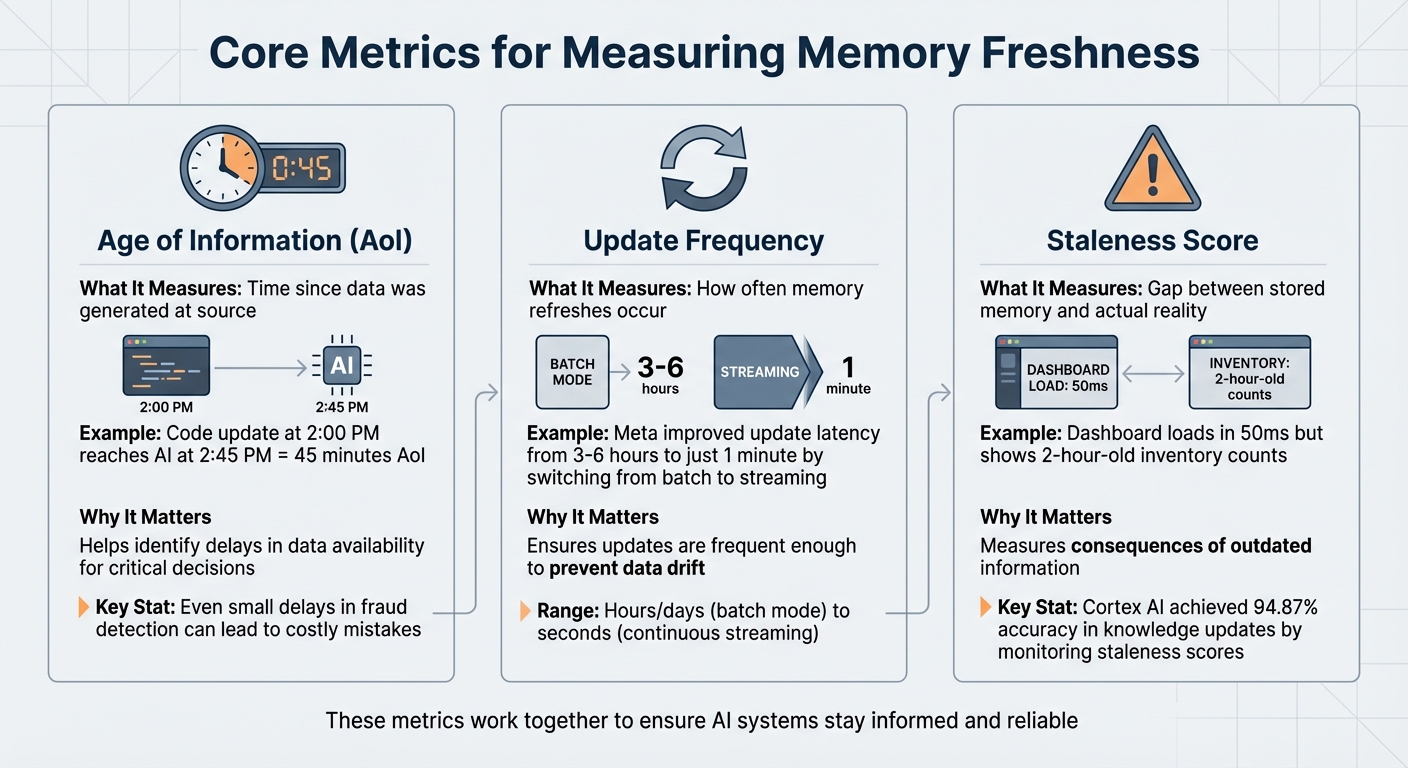
When dealing with shared memory in AI systems, keeping data fresh is crucial. Three key metrics - Age of Information, Update Frequency, and Staleness Score - help identify when data becomes outdated. These metrics not only highlight potential issues but also ensure that your AI system operates with up-to-date information. Let’s break down each one to see how they contribute to maintaining timely data.
Age of Information (AoI)
The Age of Information (AoI) measures how much time has passed between when data is created and when it becomes accessible to your AI system. For example, if a code update happens at 2:00 PM but doesn’t appear in your AI’s memory until 2:45 PM, the AoI is 45 minutes. In applications like fraud detection, even small delays can lead to costly mistakes.
The simplicity of AoI lies in its tracking: you just compare the timestamps from when an event occurs to when your system processes it. While AoI tells you how long the delay is, it works hand-in-hand with update frequency to ensure data remains current.
Update Frequency
This metric monitors how often your shared memory system refreshes its data. Updates can range from being processed in hours or days (batch mode) to every few seconds (continuous streaming). For instance, Meta improved their model update latency from 3–6 hours to just 1 minute by transitioning from batch processing to streaming tensors.
Some systems, like Knowledge Plane, use scheduled tasks (referred to as Skills) to automate these updates, eliminating the need for manual oversight. Keeping a close eye on update frequency ensures your refresh intervals match your system’s operational demands.
Staleness Score
The Staleness Score measures the difference between the system’s stored data and the real-world conditions it represents. Unlike validation errors, stale data can pass technical checks but still lead to poor decisions because it's outdated. As Tacnode Blog puts it:
A dashboard that loads in 50 ms but shows two-hour-old inventory counts isn't fast - it's fast at being wrong.
This metric highlights the risks of relying on outdated information. For example, in early 2026, Cortex AI achieved an impressive 94.87% accuracy in knowledge updates by actively monitoring and reducing staleness scores.
| Metric | What It Measures | Why It Matters |
|---|---|---|
| Age of Information (AoI) | Time since data was generated at source | Helps identify delays in data availability for critical decisions |
| Update Frequency | How often memory refreshes occur | Ensures updates are frequent enough to prevent data drift |
| Staleness Score | Gap between stored memory and actual reality | Measures the consequences of outdated information |
These metrics work together to ensure your AI system stays informed and reliable, even in fast-paced, data-driven environments. By tracking them, you can quickly spot and address any lapses in memory freshness.
Prerequisites and Tools for Measuring Memory Freshness
To measure memory freshness effectively, you need a system that's both well-designed and properly equipped. This includes infrastructure capable of tracking event timestamps and record timestamps. Without these, accurately calculating data delays is impossible.
Accessing Memory Logs and Timestamps
Your memory system must log both creation and update timestamps for every entry. Tools like Mem0 are particularly useful here, as they allow you to inject custom Unix timestamps (measured in seconds since epoch) during memory creation. This feature is critical when importing historical data or maintaining the correct sequence of events.
For vector databases like Pinecone, tracking Log Sequence Numbers (LSNs) is key. LSNs are unique, sequential identifiers assigned to each write operation. By comparing the x-pinecone-max-indexed-lsn from query response headers with the x-pinecone-request-lsn from your writes, you can confirm whether recent updates are reflected in your queries.
Using Analytical Tools
Analyzing memory freshness often involves tools like Python and Pandas. These can help you examine timestamp distributions and calculate the Age of Information across your memory logs. When dealing with systems that have intricate relationships, NetworkX is invaluable for mapping connections between entries and pinpointing outdated or redundant information. In graph-based memory setups, tracing queries can reveal stale nodes that impact related data. With these tools, you’ll be well-prepared to assess and maintain memory freshness.
Setting Up Shared Memory Systems
Shared memory systems like Knowledge Plane use scheduled jobs and a blend of graph and vector memory for automated updates. If you prefer a DIY approach, tools like LangGraph's RedisSaver or vector stores such as RedisVL and Pinecone can work just as well. Redis, for example, offers sub-millisecond read speeds, making it perfect for real-time applications where up-to-date information is critical. Additionally, your system should support metadata filtering based on timestamps, user IDs, and memory types.
The ultimate goal is to ensure your infrastructure not only tracks what your AI knows but also when it learned it. Without this temporal context, measuring freshness becomes a guessing game rather than a precise science.
How to Measure Memory Freshness: Step-by-Step
Now that your infrastructure is set up, it’s time to put it to work. Measuring memory freshness isn’t something you do just once - it’s an ongoing effort. It involves collecting data, doing calculations, and keeping an eye on things regularly. Here’s a step-by-step guide to help you create a reliable process for evaluating memory freshness in your AI system.
Step 1: Collect Timestamps from Memory Entries
Start by querying your memory store to pull out two key timestamps for each entry: the original time (record_ts) and the storage time (timestamp). This allows you to calculate the ingestion delay, which is the gap between when data was created and when it entered your system. For AI systems with long-term memory, treat each entry as a vertex with timestamps precise to the microsecond to preserve the correct sequence of events. If you’re using vector databases like Pinecone, extract Log Sequence Numbers (LSNs) from HTTP headers (e.g., x-pinecone-request-lsn) to track data writes. Make sure to add timestamps to metadata labels during the chunking process so they remain intact even if the data gets split into fragments.
With these timestamps in hand, you can move on to calculating the delay using a metric called Age of Information.
Step 2: Calculate Age of Information (AoI)
Once you’ve gathered the timestamps, calculating AoI is simple: subtract the last update time from the current time. For instance, if a memory entry was updated at 2:15 PM and it’s now 2:45 PM, the AoI is 30 minutes. Standardize your timestamps (e.g., converting nanoseconds to minutes by dividing by 60,000,000,000) to keep things consistent. You should also calculate the Average AoI and Peak AoI across your entire memory store to get a sense of overall performance.
Step 3: Monitor Update Frequency via Scheduled Jobs
Scheduled jobs play a big role in keeping memory fresh. Keep track of how often these jobs run and whether they complete successfully. In systems like Knowledge Plane, scheduled jobs (or Skills) automatically refresh memory by pulling updates from sources like code repositories, documents, tickets, and team chats. To measure reliability, monitor the Update Velocity Score (UVS), which quantifies how consistently updates occur. Set up automated alerts to flag unusual ingest latency so you can catch and fix delays before they lead to outdated AI responses. If you notice jobs failing or running inconsistently, investigate immediately to prevent memory decay.
Once you’ve nailed down the update frequency, it’s time to test whether the data still matches reality by sampling.
Step 4: Assess Staleness Using Sampling
Sampling helps you check whether your AI agent’s responses align with current information. Use benchmarks like LongMemEval-s (a set of 500 questions) to test for temporal reasoning and knowledge updates. For example, Cortex AI scored 90.23% overall on this benchmark, with 94.87% accuracy for knowledge updates and 90.97% for temporal reasoning. You can also manually sample queries and compare the AI’s responses with trustworthy external sources. Test for Selective Forgetting by verifying that outdated or conflicting data has been corrected or removed. To avoid overwriting important details, version your knowledge instead of replacing entries outright. This ensures your system stays accurate and up-to-date.
Step 5: Analyze Freshness Propagation in Graph Memory
In graph-based memory systems, freshness doesn’t exist in isolation - it spreads through relationships. Make sure temporal connections within your shared memory remain consistent. To do this, calculate the temporal displacement (Δt) between linked nodes to see how information flows over time. Track a local coherence metric by averaging the similarity across recent memory edges; if this metric drops, it could indicate memory drift or inconsistency. Use a distance function that factors in both time gaps and semantic similarity, assigning weights to balance the two. This helps you understand how outdated nodes might affect related data. For large datasets, apply B-tree indexes to timestamp columns for efficient retrieval of time-sensitive entries.
This step is particularly important in systems like Knowledge Plane, where graph memory tracks relationships like ownership and dependencies. A stale node - like one representing a code module - could mislead the entire dependency chain if not addressed. Keeping these relationships fresh ensures your system remains reliable and accurate.
Interpreting Results and Setting Freshness Thresholds
Once you've measured your freshness metrics, the next step is to interpret them. This helps you assess system performance and define acceptable thresholds for data freshness.
Analyzing Freshness Metric Distributions
After gathering freshness metrics, take time to understand what they reveal about your system. In batch-processed shared memory systems, freshness often follows a sawtooth pattern. Data age increases steadily until a new batch resets it. If the data age keeps climbing beyond the expected interval, it could indicate a pipeline failure.
It’s also important to differentiate between two key concepts: freshness (how old the data is at a given moment) and latency (how long it takes for data to move through the system). High latency often precedes freshness issues, serving as an early warning for resource bottlenecks or sudden volume surges. To identify delays, track three key timestamps: Event Time (when the data was created), Ingestion Time (when it entered your system), and Processing Time (when it was written to its final destination). For example, in operational workloads, a change might appear 2.5 seconds stale if it takes 1 second to reach a message bus, another second to be consumed, and 0.5 seconds for transformation. These details help you define meaningful thresholds, which are critical for maintaining system performance.
Setting Thresholds and Alerts
Use your analysis to establish thresholds tailored to your specific use case. For instance, fraud detection systems may demand near-instant freshness, while financial reporting can allow for longer delays. In batch systems, avoid triggering alerts simply because data age is not zero. Instead, base thresholds on your batch schedule and include a buffer for processing time. For example, if jobs run every 15 minutes, set an alert threshold of 20–25 minutes to account for normal variability.
"A perfectly accurate record from an hour ago is still wrong if the world has changed." - Tacnode
To avoid overwhelming your team with alerts, implement sensitivity settings like Narrow, Default, and Wide to filter out minor delays. For critical workflows, consider adding application-level logic to block actions when data staleness exceeds acceptable limits. Additionally, streamline performance by using a dedicated metadata table instead of costly SELECT MAX(timestamp) queries on large datasets.
Best Practices for Shared Memory Systems
Maintaining freshness in shared memory systems requires consistent effort. Use tiered retention policies to manage data effectively. For example, session context might expire after seven days, while user preferences could remain indefinitely. This prevents memory overload and ensures better search results and system performance.
For systems like Knowledge Plane, which rely on scheduled jobs (referred to as "Skills") to maintain freshness, regularly verify that update processes are functioning correctly. Set up automated alerts for unusual ingestion delays, and visualize metrics as time series (e.g., in 10-minute intervals) to quickly identify anomalies. Synchronize freshness checks to occur 1–2 hours after batch job completion to capture the most relevant data without straining query resources. By combining these strategies with well-defined thresholds, you can ensure your system remains responsive and reliable over time.
Conclusion
Key Takeaways
Keeping AI systems relevant as your code, documentation, and team knowledge evolve hinges on memory freshness. Metrics like Age of Information (AoI), Update Frequency, and Staleness Score offer measurable ways to assess how current your system's knowledge is. Without proper memory management, AI agents lose approximately 98% of conversation history beyond the immediate context window. On the flip side, well-managed memory can boost task completion speed by over five times.
Incorporating these metrics into a structure that mirrors human memory - dividing it into working, episodic, and semantic layers - can significantly enhance performance compared to simpler, single-layer systems. As highlighted by the ICLR 2026 Workshop on Memory for LLM-Based Agentic Systems:
Memory is not static; it evolves over time.
This underscores the importance of accounting for temporal drift, performance drop-offs during extended interactions, and the necessity for active memory consolidation policies.
For shared memory systems like Knowledge Plane, which relies on scheduled jobs (Skills) to maintain freshness across codebases, documentation, tickets, and team chats, the stakes are even higher. User satisfaction surges by 67% when agents recall past interactions and preferences accurately. Additionally, preserving raw textual context - rather than overly compressing data - avoids severe performance drops, as excessive compression can reduce F1 scores by over 50%.
These findings provide a clear path for improving your AI system's memory management right now.
Next Steps for Engineering Teams
Engineering teams can take practical steps to ensure their systems remain fresh and effective:
- Establish baseline metrics: Measure your system’s current performance. Aim for retrieval precision above 80% and recall above 70% to maintain relevance and comprehensiveness. Monitor detection times for critical issues, targeting sub-0.6 seconds for outages, and track your "burn rate" against Service Level Objectives.
- Implement tiered retention policies: Differentiate between temporary session data (e.g., 7-day expiration) and permanent user preferences. Use signals like user bookmarks, interaction frequency, and temporal decay to prioritize what data remains fresh.
As noted by Supermemory Research:
The ability to accurately recall user details, respect temporal sequences, and update knowledge over time is not a 'feature' - it is a prerequisite for Agentic AI.
- Leverage smart chunking and metadata: Combine chunking strategies with metadata tagging (e.g., timestamps, source, importance) to create multi-stage retrieval pipelines. This ensures your system adapts to evolving team needs rather than becoming a static snapshot of outdated information.
FAQs
What’s a good AoI target for my AI use case?
A good Age of Information (AoI) target largely depends on your specific use case and how quickly you need real-time updates. For scenarios like conversational AI or managing code, keeping the AoI between a few seconds to under a minute helps ensure the system stays sharp and responsive. On the other hand, for less time-sensitive applications, an AoI of several minutes might be perfectly fine.
For critical tasks where every second counts, it's best to aim for an AoI of less than 10 seconds. To fine-tune your target, it's a good idea to run regular benchmarking to assess and adjust based on your system's performance needs.
How do I tell latency from true staleness?
Latency refers to how fast data is retrieved, whereas staleness indicates how current the data is. To determine staleness, compare the timestamp of a real-world event to when it shows up in the system. If the delay is longer than acceptable, the data is considered stale. For example, low latency with stale data means the system retrieves outdated information quickly. On the other hand, high latency with fresh data shows the system is slow but provides up-to-date information.
How often should memory refresh jobs run?
Memory refresh jobs need to strike a balance between keeping data up-to-date and maintaining system performance. How often they run depends on the system's specific needs. For most setups, daily or weekly updates work well. However, when dealing with critical or rapidly changing information, continuous or near-real-time updates are ideal to ensure accuracy and avoid memory drift. The best schedule ultimately depends on the application's unique demands and the nature of the data.