How to Build a Shared Knowledge Base for Engineering Teams
How to Build a Shared Knowledge Base for Engineering Teams
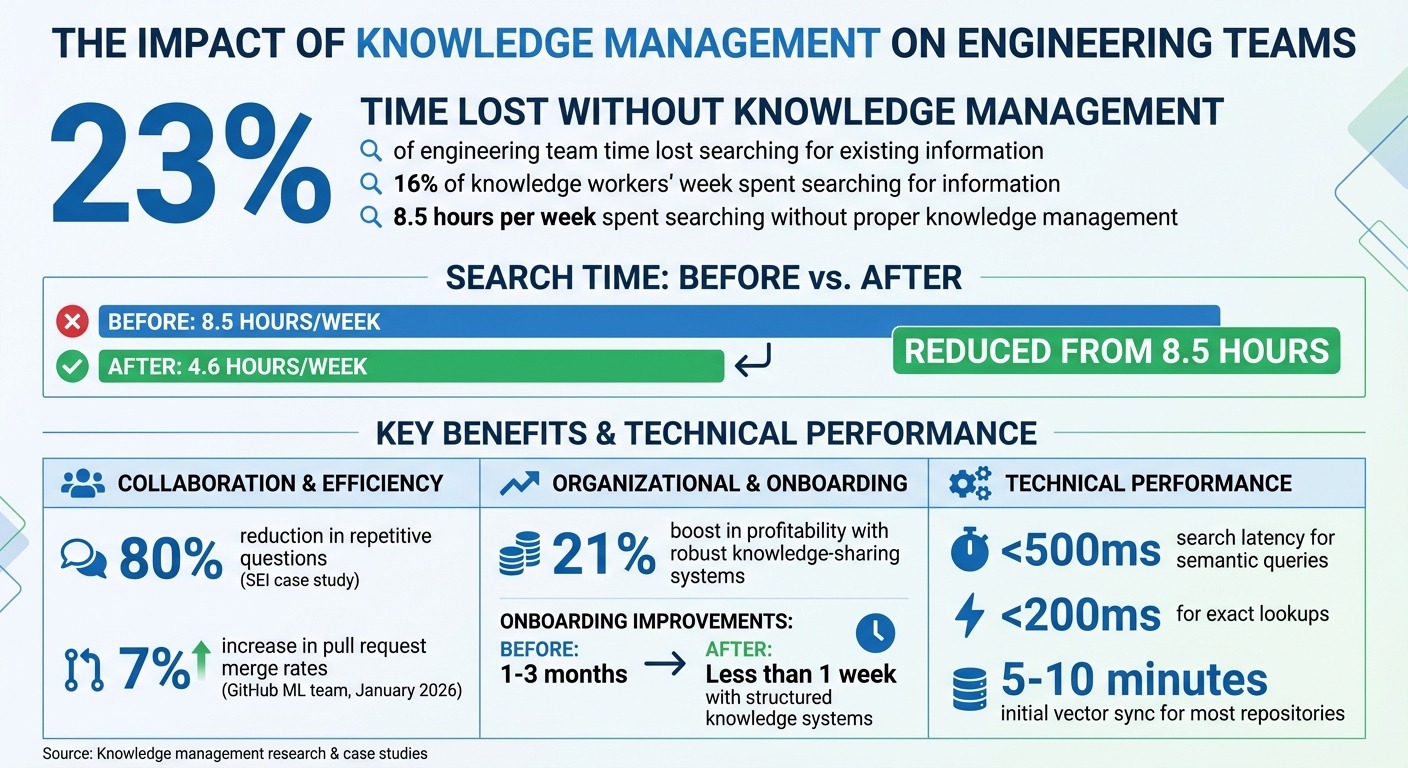
Engineering teams lose 23% of their time searching for existing information, costing millions annually. Without a centralized, up-to-date knowledge base, critical decisions, bug fixes, and architectural insights often get lost in scattered tools like Slack, GitHub, and Google Docs. This inefficiency impacts productivity, onboarding, and even the accuracy of AI tools.
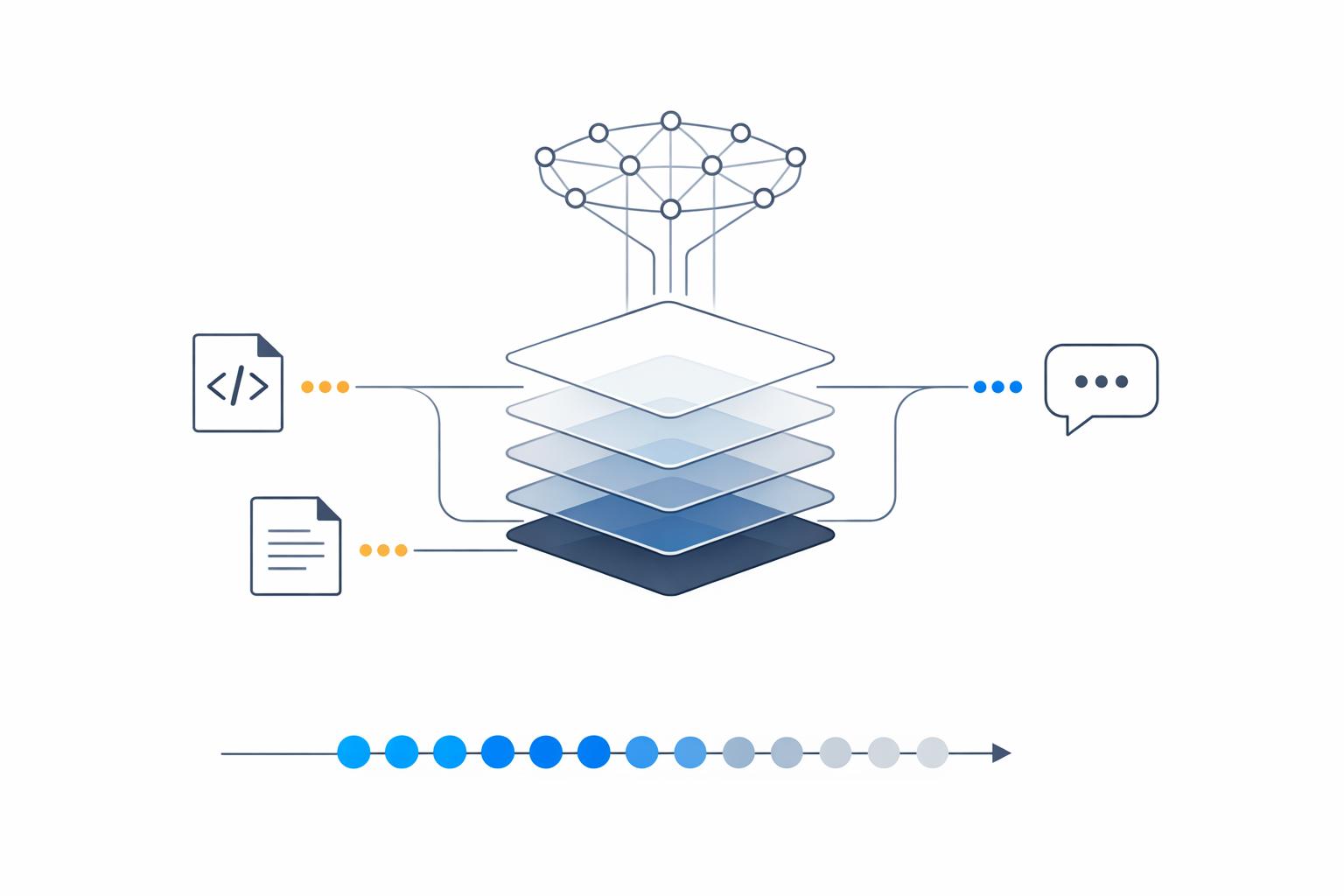
Here’s the solution: a shared knowledge base that updates automatically. Platforms like Knowledge Plane integrate code, documentation, and team chats into a single source of truth. Using graph memory and vector embeddings, it organizes information, tracks dependencies, and ensures every piece of knowledge is traceable with timestamps and ownership details.
Key steps to implement this system:
- Assess knowledge gaps: Identify silos, bottlenecks, and inefficiencies in your workflows.
- Evaluate tools: Audit existing platforms for missing documentation and search inefficiencies.
- Set up automation: Use tools like Knowledge Plane to sync repositories, documentation, and conversations.
- Leverage AI workflows: Enable context-aware AI tools that reference your centralized knowledge base.
This approach cuts wasted time, speeds up onboarding, and ensures AI tools deliver accurate, context-aware insights. Apply these strategies to make your team more efficient and aligned.
Knowledge Management Impact on Engineering Team Productivity
How I Create a Knowledge Base using OpenAI, Langchain, and Pinecone - Part 1: Setup
sbb-itb-1218984
Assess Your Team's Knowledge Needs
Before diving into creating a shared knowledge base, it’s essential to figure out where your team’s knowledge is falling short. Pinpointing these gaps is the foundation for building a centralized system that actually works. The first step? Find out where your team is losing time.
Start by examining your "bus factor" - essentially, how much critical knowledge is locked away with one person. For example, if your Slack messages repeatedly tag the same developer every time a specific service goes down, you’ve stumbled upon a knowledge silo. Or, if certain parts of your codebase always require the same person’s approval for pull requests, it’s a sign that their expertise isn’t being shared in a common resource.
"The problem isn't specialization itself... The problem is when they are the only one." - Edvaldo Freitas
Next, look for specific bottlenecks in your team’s workflows and evaluate how well your current tools address knowledge-sharing needs.
Identify Collaboration Bottlenecks
One major bottleneck is lost reasoning. Imagine a senior developer using AI to fix a tricky bug. Once the session ends, the context disappears. Weeks later, another developer faces the same issue and has to solve it all over again. You’ll notice this pattern in recurring Slack questions, duplicate support tickets, or repeated code refactorings caused by undocumented decisions.
Another red flag? Onboarding struggles. When new hires are handed a pile of documents with no context - leaving them to guess which architectural plans were implemented and which were scrapped - they can spend weeks piecing together fragile mental models. Teams with structured knowledge systems, however, can cut onboarding time to less than a week, compared to the usual one to three months.
Beyond individual knowledge silos, take a closer look at how your tools and processes might be adding to these inefficiencies.
Evaluate Current Tools and Processes
Take stock of how information flows (or doesn’t) in your organization. On average, knowledge workers spend 16% of their week just searching for information. Often, this means jumping between GitHub, Slack, Jira, Notion, and Google Docs to find answers. Reviewing your team’s search analytics can reveal areas where queries yield no useful results - clear indicators of missing documentation.
Run an AI content audit by combing through chat histories, wikis, and document folders. Use AI tools to tag and group topics, which can help you spot natural gaps in your knowledge base. For instance, if you find 50 Slack threads addressing the same deployment issue, that’s a prime candidate for documentation. SEI, for example, reduced repetitive questions by 80% after introducing a permission-aware knowledge graph that delivered answers with precise file and line references.
Lastly, check if your AI coding tools are producing inconsistent results across the team. If personal preferences override project standards - resulting in code suggestions that lack error handling or use outdated techniques - it’s a sign your team doesn’t have a single, reliable source of truth. These evaluations can help you determine where AI tools and better documentation can close the gaps.
Set Up Knowledge Plane as Your Platform
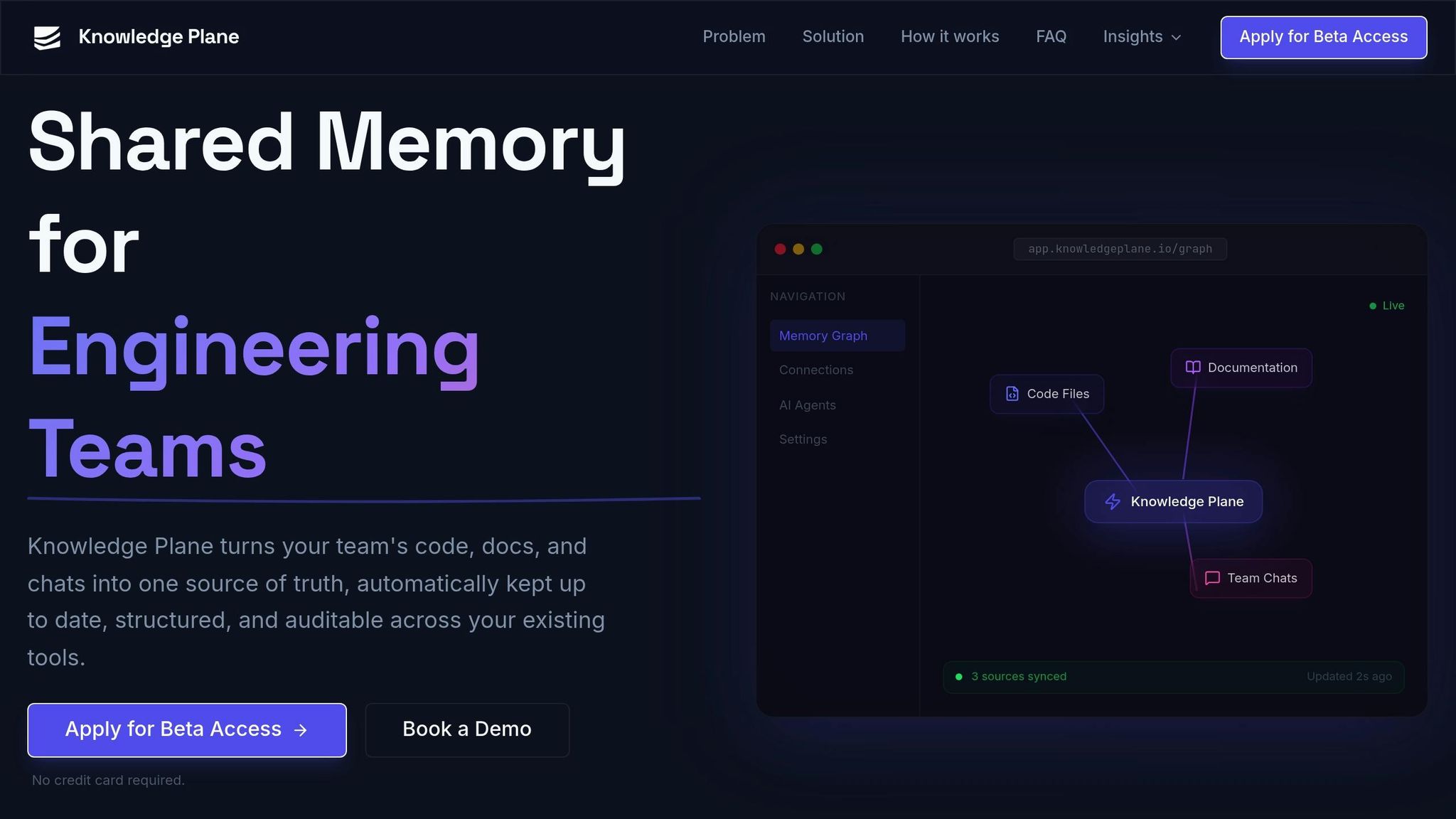
Once you've identified the gaps in your team's knowledge, Knowledge Plane serves as the ideal platform to bring all your information sources together. It offers engineering teams a shared memory system that stays up to date without requiring constant manual intervention.
Getting started is simple. Head over to knowledgeplane.io to request access. The onboarding process walks you through setting up your workspace efficiently. From the Connections menu, link your GitHub, documentation, and Slack accounts. Then, integrate AI tools such as Cursor, Claude, or your custom solution using the Model Context Protocol (MCP) or the HTTP API. Finally, configure automated updates to keep your system refreshed, eliminating the need for manual uploads. This setup directly addresses your team's needs, ensuring a centralized and current knowledge base.
"Knowledge Plane turns your team's code, docs, and chats into one source of truth, automatically kept up to date, structured, and auditable across your existing tools."
– Knowledge Plane
Key Features of Knowledge Plane
Knowledge Plane stands out for its ability to organize and structure your team's information effectively.
Instead of merely storing raw files, the platform extracts critical details into structured "knowledge cards" while keeping the original documents intact. For instance, if a developer updates a GitHub README or logs a decision in Slack, Knowledge Plane automatically updates its memory graph through scheduled jobs that reconcile and refresh the data.
The platform uses a hybrid memory system. It combines graph memory, which maps relationships like "depends_on", "owned_by", or "decided_by", with vector embeddings for quick retrieval. Each piece of information is stored with its source, owner, and timestamp, making it easy to trace and verify the origins of any AI-generated solution.
You can deploy Knowledge Plane via a managed cloud for a quick start or opt for self-hosting if you need full control over your data. Since the platform is MCP-native, it integrates smoothly with tools like Cursor, Claude, and any API-enabled service.
Knowledge Plane Plans and Pricing
Currently in Early Access, Knowledge Plane is available by application - no credit card required. Early Access includes guided onboarding sessions and gives participants a chance to influence future plans and pricing. During this phase, you'll have access to essential features like shared memory, automated updates, AI tool integrations, and traceable knowledge, all designed to eliminate information silos within your team.
Pricing details will be announced after Early Access. For now, engineering teams ready to streamline their knowledge management can apply and start building their shared memory system right away.
Integrate AI Tools and Workflows
Knowledge Plane integrates AI tools directly using the open-standard Model Context Protocol (MCP). This allows your team to access a shared knowledge base effortlessly through tools like Cursor, Claude, VS Code, or any other MCP-compatible platform - all without needing to switch between contexts.
Connect Code Repositories and Documentation
You can link essential data sources - such as GitHub for code changes, wikis or Google Drive for documentation, and Slack for conversation tracking - right from your workspace dashboard.
Knowledge Plane works by extracting key facts and relationships from your files while keeping the originals untouched. It uses "Skills", which are scheduled background jobs, to automatically sync data and detect any inconsistencies between your original sources and the knowledge base. This eliminates the hassle of manual updates.
To simplify integration, include a .mcp.json file in your repository. This file ensures AI tools are auto-connected. For authentication, use environment variables like ${VAR} to manage individual API keys securely.
Once your data sources are linked and synchronized, your AI tools are ready to deliver more efficient, context-aware workflows.
Use AI-Driven Workflows
With the shared knowledge base in place, you can now query it using natural language. For example, you might ask, "What did we decide about the auth refactor?" The platform's hybrid memory system combines graph relationships (like depends_on and owned_by) with vector embeddings. This setup allows the AI to grasp complex dependencies and trace decision histories, ensuring your team always has access to accurate, up-to-date information.
To maintain consistency across your team, you can add a .cursorrules or CLAUDE.md file to your project root. This file instructs the AI to search the Knowledge Plane first before relying on local files or generic training data. Additionally, you can use commands like session(action="capture") to document architectural decisions during coding sessions.
Every AI response includes a source citation, owner, and timestamp, giving you verifiable and production-ready outputs for your projects.
Implement Graph and Vector Memory
By integrating hybrid memory into AI workflows, your team gains access to context-rich information that can transform decision-making. Knowledge Plane's hybrid memory system combines two powerful approaches: graph memory, which organizes connected facts with typed relationships like DEPENDS_ON, RESOLVED_BY, and PART_OF, and vector memory, which uses embeddings to perform fast semantic searches. Together, these systems create a centralized knowledge base that supports informed decisions at every level.
"Knowledge Plane combines graph memory (typed relationships like 'Service A depends on Service B') with vector embeddings. This means your agents can reason about dependencies, ownership, and timelines - not just match keywords."
Vector memory is perfect for quick lookups. For example, if you ask, "What did Emma say about React optimization?" it retrieves the relevant information almost instantly. Graph memory, on the other hand, provides deeper context by showing how decisions and dependencies are interconnected - like tracing how an architectural choice impacts data models or pinpointing which pull request resolved a specific issue. In December 2025, Medidata, under Jesper Linvald's leadership, implemented a persistent memory system that achieved search latency of less than 500ms for semantic queries and under 200ms for exact lookups across over 10,000 stored memories.
How Graph Memory Adds Context
Graph memory links related pieces of knowledge through typed relationships, reflecting how teams collaborate. For instance, recording that "Feature Task A depends on API endpoint B" creates a DEPENDS_ON relationship. Similarly, when a bug is fixed, the system establishes a RESOLVED_BY link between the issue and the corresponding pull request. These relationships allow AI agents to navigate through chains of decisions, offering a full picture of the development history behind any given component.
The system also automatically resolves duplicates. If "Alice Johnson" is mentioned in one document and "A. Johnson" in another, graph memory merges them into a single node, ensuring a unified source of truth. Each node maintains references to its original sources, such as file locations, page numbers, or timestamps, so your team can always verify the accuracy of AI-generated insights.
Use Vector Memory for Fast Retrieval
While graph memory provides in-depth relational context, vector memory offers fast access to standalone facts. It excels at semantic search across diverse sources like documentation, code comments, or chat logs. Instead of storing entire documents, Knowledge Plane breaks information into atomic facts and structured knowledge cards, converting them into high-dimensional embeddings. This allows the system to retrieve semantically similar content, even if the exact phrasing differs.
Vector memory is ideal for quickly finding isolated facts or FAQs, such as "Emma specializes in React". For more complex queries involving dependencies or organizational structures, graph memory is the better choice. Most engineering repositories can complete their initial vector sync in just 5–10 minutes, and you can use metadata tags (like type, status, or dueDate) for more precise filtering during searches. Together, these tools deliver both speed and a deeper understanding of context.
Maintain and Scale Your Knowledge Base
Keeping a knowledge base up-to-date is essential. Instead of relying on rigid, calendar-based reviews, consider adopting change-driven updates. Automated monitors can alert teams whenever upstream sources are modified, prompting timely reviews. This approach avoids the pitfalls of quarterly audits, which often result in "review fatigue." When teams rubber-stamp pages without changes, they risk overlooking critical updates that happen between scheduled cycles.
To ensure accountability, assign ownership to every piece of knowledge. Set review intervals based on the level of risk: for example, high-risk content like security protocols might require checks every 30–60 days, while more stable, evergreen content could be reviewed every 180 days. Tools like Knowledge Plane's "Skills" feature can simplify this process by automating background tasks. It reconciles knowledge across platforms like Slack, GitHub, and documentation, identifying discrepancies and ensuring consistency.
Test and Validate Knowledge Accuracy
Automating maintenance is only part of the equation; you also need to verify the accuracy of your knowledge base. For instance, in January 2026, GitHub's machine learning team implemented an agentic memory system. This innovation boosted pull request merge rates by 7% and improved code review precision by 3%, thanks to live code references for every fact.
"Information retrieval is an asymmetrical problem: It's hard to solve, but easy to verify." - Tiferet Gazit, Principal Machine Learning Engineer, GitHub
Track metrics like answer rates and accuracy over time. A drop in these metrics could indicate that your knowledge base needs refreshing. Treat your knowledge base rules like code by storing them in version-controlled files - such as .cursor/rules/ or CLAUDE.md - within your repository. This ensures they go through the same pull request review process as your codebase. If a code review identifies a missed pattern, update the associated rule file immediately within that pull request to address the issue.
Scale Knowledge Plane for Larger Teams
As your team grows, scaling your knowledge system becomes a priority. For larger groups, create isolated workspaces for each team and secure access using scoped API keys. To ensure documentation stays aligned with code, store it in feature-specific files, making it easier to update during commits. Keep the main memory index concise - under 200 lines - by offloading detailed notes to topic-specific files.
Knowledge Plane supports scalability by offering both managed cloud and self-hosted deployment options, allowing you to meet varying security and compliance needs. By following these strategies, your knowledge base will remain efficient, reliable, and adaptable to future challenges.
Conclusion
Creating a shared knowledge base can revolutionize the way engineering teams collaborate. Knowledge Plane establishes a self-updating shared memory, cutting down on time spent re-explaining architectures and preserving critical context that often gets lost between AI sessions.
The benefits are tangible: Companies with strong knowledge management practices reduce the time employees spend searching for information from 8.5 hours per week to just 4.6 hours. Additionally, organizations with robust knowledge-sharing systems report up to a 21% boost in profitability. Knowledge Plane achieves these outcomes by combining graph and vector memory, automating updates via Skills, and ensuring full traceability - every piece of information is tied to a source, owner, and timestamp.
The secret lies in treating your knowledge base like production code. By connecting all silos and relying on automated background processes, your system stays current without manual effort. When a senior developer solves a complex issue, their insights become permanently accessible to the entire team.
"Knowledge Plane is shared memory that updates itself, so your team stops re-explaining and your AI tools stop forgetting." - Knowledge Plane
This approach offers a clear advantage, encouraging teams to get started immediately. With its automated and auditable memory system, Knowledge Plane’s early access program provides an opportunity to experience these benefits firsthand. The platform is currently in early access, and you can apply for beta access without needing a credit card. Early adopters will play a role in shaping the platform as it transitions beyond private beta. Now is the time to implement these strategies and build a scalable, impactful knowledge foundation.
FAQs
What should we include in our engineering knowledge base first?
When building a knowledge base, the first step is to clearly outline its purpose and focus on the most important, frequently referenced information. This helps ensure it serves as a reliable resource for your team. Here’s how to get started:
- Gather Key Resources: Bring together technical documentation, code repositories, and decision records in one place. This consolidation ensures that critical information is easy to find and reference.
- Organize for Clarity: Break down knowledge into structured, machine-readable sections. Using semantic organization makes the information easier to navigate and understand, both for humans and AI systems.
- Set Standards for Consistency: Implement version-controlled guidelines to maintain uniformity across entries. Consistent formatting and updates keep the knowledge base accurate and dependable.
By following these steps, you can build a centralized, well-organized knowledge base that boosts collaboration and streamlines productivity.
How does graph memory differ from vector search in Knowledge Plane?
Graph memory works by structuring knowledge as interconnected nodes, where each node represents a piece of information and the connections highlight their relationships. This setup makes it easier to understand both the structure and the context of the data.
In contrast, vector search transforms data into high-dimensional vectors, enabling searches based on semantic meaning rather than relying solely on keywords. This allows for more intuitive and flexible retrieval of information.
When combined, these two methods strengthen the Knowledge Plane by blending the detailed, structured relationships of graph memory with the quick, meaning-focused capabilities of vector search. This synergy creates a powerful system for organizing and accessing knowledge.
How do we keep the knowledge base accurate without extra manual work?
Keeping a knowledge base accurate can be a challenge, especially as projects evolve. The solution? Automate the process of pulling in relevant data. Tools like Knowledge Plane can handle this by connecting to documentation, code repositories, and chat platforms. They automatically extract and sync updates, ensuring everything stays up-to-date.
Features such as version control integration and continuous synchronization make it easier to maintain accuracy without constant manual input. This means your team can focus on their work while the knowledge base updates itself in real time.