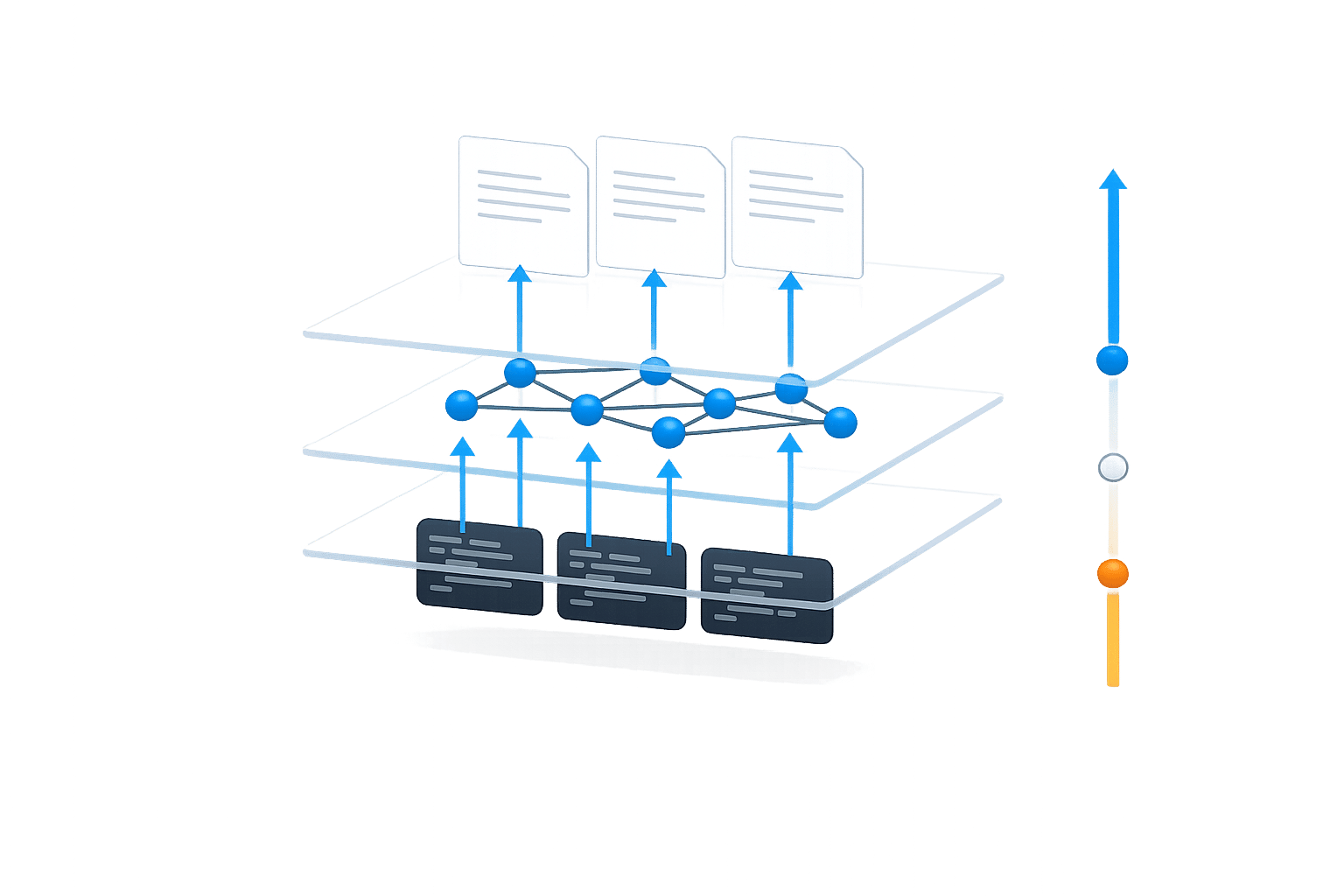
7 Ways to Keep Team Documentation Up to Date Automatically
7 Ways to Keep Team Documentation Up to Date Automatically
Engineering teams often struggle to keep documentation updated as their codebases evolve. With tools like Git, Jira, and CI/CD generating constant changes, manual updates can’t keep pace. This leads to outdated documentation, blocking 60% of developers and increasing support tickets.
Here’s how automation solves this problem:
- Shared memory systems link code, documentation, and team discussions, syncing updates automatically.
- AI agents detect changes and draft updates, cutting Mean Time to Update (MTTU) from 9 days to 6 hours.
- Graph memory maps dependencies and ownership, ensuring updates reflect system-wide changes.
- Active memory enables real-time collaboration between AI agents, keeping knowledge consistent.
- Source tracking ensures every update is verifiable and audit-ready.
- API integrations connect tools like GitHub and Jira for seamless updates.
- Access controls secure documentation updates, limiting changes to authorized users and tools.
Automation saves time, reduces errors, and ensures documentation evolves alongside your codebase.
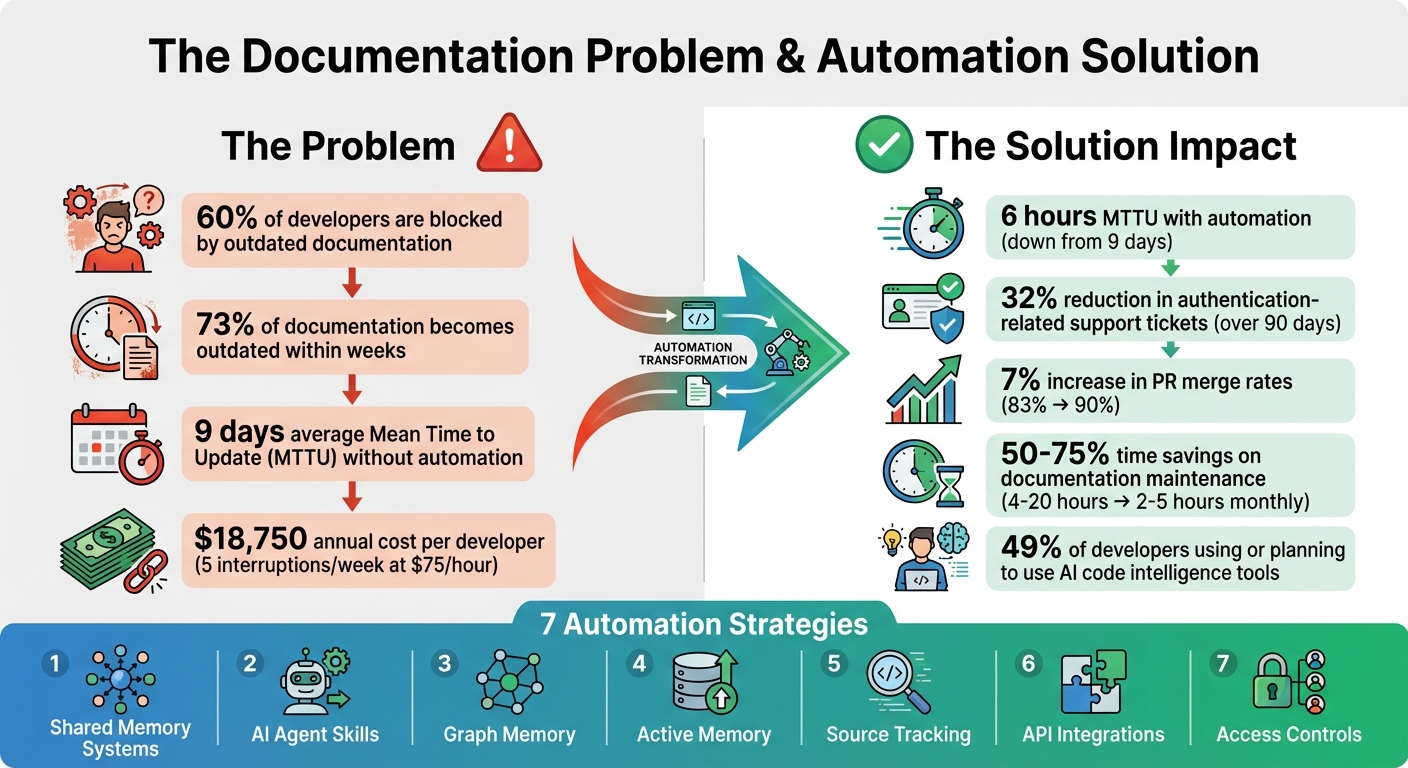
Impact of Documentation Automation on Development Teams: Key Statistics and Time Savings
How I Built a Tool to Auto-Generate GitHub Documentation with LLMs
sbb-itb-1218984
1. Use Shared Memory Systems with Automatic Syncing
Static documentation can quickly become outdated, leaving teams scrambling to keep up with changes. Shared memory systems tackle this issue by embedding documentation directly alongside your code. This setup allows knowledge to evolve naturally as your codebase changes. With automatic syncing, these systems continuously monitor repositories, pull request discussions, and support channels to keep documentation up to date.
These features are designed to integrate effortlessly into your development workflow.
Automation Capabilities
Shared memory systems use event-driven updates to ensure documentation stays relevant. For example, when pull requests are merged, code is pushed, or support tickets are resolved, the system generates updates automatically. A notable application of this concept came in January 2026, when GitHub introduced an agentic memory system for GitHub Copilot. This system used just-in-time verification with precise citations to specific code locations. During A/B testing, it boosted pull request merge rates from 83% to 90% and improved positive feedback on automated code review comments by 2%. It also flagged inconsistencies when API updates weren't reflected in the documentation.
Tiferet Gazit, Principal Machine Learning Engineer at GitHub, highlighted its impact:
"Cross-agent memory allows agents to remember and learn from experiences across your development workflow, without relying on explicit user instructions."
This automation ensures that documentation evolves alongside the code, making it a dynamic part of the development process.
Integration with Existing Tools
Shared memory systems connect with a variety of tools across your engineering stack. They gather data from sources like code diffs, pull request discussions, issue trackers (e.g., Jira, Linear), and support platforms (e.g., Zendesk, Intercom). This multi-source approach not only captures what has changed but also explains why it changed, preserving the context behind technical decisions. For instance, Knowledge Plane integrates these elements into a unified source of truth, using graph memory to map dependencies and ownership across your projects.
Real-Time Updates and Traceability
Git-based traceability provides a version-controlled history of every documentation update. This means you can pinpoint exactly when and why changes were made, much like tracking code revisions. Before applying stored knowledge, AI agents verify citations against the current branch state to ensure the referenced code is still valid. This step prevents outdated or incorrect information from creeping into your documentation. Draft updates are also reviewed for tone and accuracy before being finalized, ensuring the documentation remains reliable and professional.
2. Set Up AI Agent Skills for Scheduled Documentation Updates
AI agent skills take documentation maintenance to the next level by adding scheduled, proactive updates to the mix. These agents work autonomously, using CLI tools to integrate seamlessly into your CI/CD pipeline or local environment. Instead of relying on someone to remember to update the docs, these agents detect changes in your codebase and handle routine updates automatically. Combined with the shared memory system's syncing, this approach ensures documentation stays accurate and up-to-date.
Automation Capabilities
AI agent skills are designed to operate on schedules or triggers, performing automated workflows to keep your documentation aligned with code changes. For example, when a version number changes, an API schema is updated, or a new code snippet appears, the agent detects these modifications and drafts the necessary documentation updates.
Back in early 2026, Siddhant Khare, an engineer at Ona, implemented a docs sync agent that analyzed daily git diffs. This reduced his documentation workload from a 30-minute task to just a 30-second review process. Another example comes from a Series B API-first SaaS company that used "doc-impact" labels on pull requests to trigger updates. By doing so, they cut their Mean Time To Update (MTTU) from 9 days to just 6 hours. Over 90 days, this approach led to a 32% drop in authentication-related support tickets. These agents excel at managing micro-updates, such as renamed endpoints, deprecated flags, or new environment variables, ensuring documentation stays reliable and avoids falling out of sync.
Integration with Existing Tools
These scheduled updates integrate effortlessly with your existing tools, creating a unified workflow. AI agents connect to platforms like GitHub, GitLab, Jira, Linear, Notion, and Confluence through APIs and webhooks. Specialized tools, such as doc-serve, index private knowledge bases and proprietary codebases using AST-aware chunking. This ensures that functions and classes remain intact, preserving their semantic meaning. Other skills, like auto-updater, run daily via cron jobs to sync installed tools, while knowledge-graph synthesizes facts and entities weekly. Together, these tools work alongside Knowledge Plane's graph memory to maintain a structured, queryable knowledge base that evolves with your code.
Real-Time Updates and Traceability
One standout feature of these agent skills is their ability to handle Git events with precision. They generate documentation updates in dedicated branches, such as {branch}-docs-update-{timestamp}, providing a clear audit trail. This ensures that every change is versioned and traceable, just like your codebase. Instead of auto-merging updates, agents submit them as pull requests, allowing your team to review for tone, accuracy, and brand consistency before publication. This human-in-the-loop process strikes a balance between automation and editorial oversight, ensuring your documentation stays polished while removing the manual burden of tracking and implementing updates. The result is a system that proactively identifies and resolves discrepancies between your product and its documentation.
3. Use Graph Memory to Track Dependencies and Ownership
Graph memory takes documentation to a new level by turning it into a connected knowledge graph that maps out relationships between your codebase, tasks, and architectural decisions. Instead of relying on manual tracking of team ownership or component dependencies, this system creates a dynamic model using relationship types like DEPENDS_ON, OWNED_BY, PART_OF, and IMPLEMENTS. For example, imagine a developer updates a payment gateway. With graph memory, the system can trace the ripple effects of that change across multiple APIs and webhooks through "Multi-Hop Reasoning", uncovering indirect connections without any manual effort.
Automation Capabilities
Graph memory automates the process of tracking ownership by building internal models during repository snapshots. Every merged pull request triggers an automatic update to the graph, reflecting how dependencies shift as your system evolves. The system captures information directly from code diffs and pull request discussions, eliminating the need for manual data entry. Features like "Community Detection" group related concepts - such as identifying all components within your Data Layer - and pinpoint central nodes that have the most influence on your project. Commands like /consolidate streamline the graph by merging similar entries and removing unnecessary data, improving retrieval speeds by as much as 35%.
Integration with Existing Tools
This system works seamlessly with tools like GitHub, GitLab, Jira, Linear, and Slack, creating a persistent knowledge base that fits right into your workflow. Most repositories complete their initial sync in just 5 to 10 minutes, making the graph searchable almost immediately. Importantly, it respects the permissions of your existing tools, ensuring team members only access documentation they’re authorized to see. Unlike semantic search, which relies on vector similarity, graph retrieval uses pathfinding and centrality analysis to provide context based on real, actionable connections in your system. These integrations make it easier to access and understand dependencies and ownership details without extra effort.
Real-Time Updates and Traceability
Graph memory enhances traceability by adding version control for dependencies. A notable example comes from January 2026, when GitHub implemented a repository-scoped memory system for GitHub Copilot, led by Principal Machine Learning Engineer Tiferet Gazit. Using graph memory, the system flagged that API version tracking needed alignment across src/client/sdk/constants.ts, server/routes/api.go, and docs/api-reference.md. When a developer updated only one of these, the system identified the oversight and suggested the missing updates. This resulted in a 7% increase in pull request merge rates (90% with memories vs. 83% without) and a 2% bump in positive feedback on automated code reviews.
Graph memory also provides a versioned record of system evolution, a crucial feature for compliance and security audits. Each memory includes its source (e.g., file_path:line_number), allowing real-time verification against the current codebase. By treating documentation as a living, evolving model, graph memory ensures your development process stays aligned with the latest changes.
4. Connect Active Memory for Real-Time AI Agent Collaboration
Active memory builds on shared and graph memory systems to enable AI agents to collaborate in real time, creating a dynamic and continuously updated context for your codebase.
With active memory, AI agents can access and update shared knowledge instantly. For example, if a coding assistant identifies a key database pattern or an architectural decision, that information is immediately available to other agents managing tasks like code reviews or documentation. This eliminates the need to repeatedly explain team conventions, ensuring that the most current information is always at hand. The result? A smoother, more collaborative workflow for your entire team.
Automation Capabilities
Active memory systems can automate updates to your service and dependency models with every merged pull request. AI agents can store actionable patterns they encounter during tasks using simple commands like execute-task --update-memory. You can even set up workflows to automatically generate draft documentation pull requests whenever new code is pushed to the main branch.
To maintain relevance, many systems automatically delete stored memories after 28 days unless validated for ongoing use. Additionally, AI agents verify stored citations against the current codebase before applying them, ensuring that only accurate and up-to-date information is utilized.
Integration with Existing Tools
Active memory integrates seamlessly with existing workflows using protocols like the Model Context Protocol (MCP). MCP provides a structured and queryable way for AI agents to stay informed without manually adding files to a context window - a process that can consume tokens and doesn't scale well.
Beyond MCP, these systems can link with tools like Slack or support ticketing systems. This allows closed tickets and product updates to automatically generate draft documentation, streamlining the documentation process.
"The hardest part of AI-assisted development isn't writing better prompts... It's equipping AI agents with up-to-date information in a stable, standardized fashion." - Eric J. Ma
By ensuring new information is instantly integrated into the system, active memory becomes a reliable resource for all collaborating agents.
Real-Time Updates and Traceability
Active memory systems categorize updates by project, orchestration, and feature levels, ensuring that changes are directed to the appropriate teams. Each memory entry includes its source reference, allowing agents to verify it against the current codebase in real time. This helps prevent "context rot", ensuring that outdated information doesn’t creep into your workflows.
Security and Access Control Features
Active memory is typically scoped to a repository rather than individual users. This design ensures that knowledge specific to a private codebase remains confined to that repository and is accessible only to those with the proper permissions. Furthermore, only users with write access can create new memory entries, reducing the risk of unauthorized or low-quality information entering the system. This approach safeguards sensitive architectural decisions and proprietary patterns while enabling effective collaboration across your team's AI tools.
5. Track Knowledge Sources for Audit-Ready Updates
When automating documentation updates, it's crucial to log the sources - whether they're pull requests, commits, tickets, or discussions. This practice not only ensures compliance but also builds trust by creating a clear audit trail. It complements earlier strategies by making every update both automated and verifiable.
Real-Time Updates and Traceability
Modern tools can connect change signals directly to documentation, enabling real-time updates. For instance, when a pull request is merged on GitHub, a Jira ticket is closed, or an API schema is modified, these actions can trigger updates that include citations explaining what changed and why. By storing documentation as Markdown files in a code repository, teams can take advantage of Git's version control. This approach provides a detailed, versioned history of system changes. Such methods ensure traceability by tagging every update with its source, creating a reliable audit trail.
Automation Capabilities
Automated systems can immediately detect and fix inconsistencies in documentation. For example, a monitoring tool might compare release notes with existing documentation to spot missing updates for new features. These systems can send alerts to address gaps as soon as they're identified.
Research highlights that about 60% of developers face delays due to outdated or incomplete documentation. Automation can dramatically reduce Mean Time to Update (MTTU) - cutting it from an average of 9 days to just 6 hours. By linking signals from code changes, project management tools, and support tickets, teams can quickly close documentation gaps. Combining this traceability with strong security measures ensures your documentation stays accurate and protected.
Security and Access Control Features
Strong security measures add another layer of protection to automated tracking. Audit logs capture every detail of changes - what was updated, when, and through which process. This level of traceability is critical for industries like finance and healthcare that require strict compliance. Advanced systems often implement SOC 2 compliance, OAuth integration, and role-based access controls. These features ensure that automated updates are limited to specific areas and that sensitive information remains secure.
6. Connect Existing Tools via APIs for Automatic Updates
Once you've set up proactive documentation updates with AI agents and integrated memory systems, the next step is connecting your existing tools via APIs. This approach simplifies workflows and ensures documentation stays up-to-date without disrupting your team's processes.
If your team relies on tools like GitHub, Jira, and Slack, APIs can link them together, creating a streamlined documentation pipeline. By automating updates, documentation becomes a natural part of your development workflow rather than an afterthought.
Integration with Existing Tools
API-driven workflows make it easy to keep documentation aligned with active development. For instance, GitHub Actions can monitor your repository and automatically trigger documentation updates whenever changes are pushed to the main branch. Tools like n8n and Bright Data MCP (both offering free tiers) make integration accessible by processing webhooks from GitHub, extracting code context, and sending it to AI agents for documentation updates.
The Model Context Protocol (MCP) takes things further by enabling AI agents to securely access structured data. For teams using Mintlify, the Agent API (available on Enterprise plans) can generate documentation updates as pull requests whenever the codebase changes. This method works well alongside scheduled or real-time update strategies.
Automation Capabilities
APIs shine when it comes to automating frequently changing documentation tasks. Focus on areas like API references, "Getting Started" guides, and configuration settings - these are often the first to become outdated and can cause significant roadblocks for developers. AI agents can monitor pull requests, analyze code changes, and suggest documentation updates directly within the PR workflow, either as comments or commits.
Drift detection is another powerful feature. APIs can compare your current codebase with existing documentation to identify outdated sections or missing references in your CI/CD pipeline. This is a game-changer, considering that 73% of developers say their documentation becomes outdated within weeks, and 60% frequently encounter issues due to incomplete documentation.
"The real problem isn't that developers are bad at writing documentation. It's that keeping documentation synchronized with code is a fundamentally human-intensive process." - Augment Code
The benefits are clear. Interruptions for senior developers to explain workflows can cost organizations around $18,750 annually for every five weekly interruptions (based on $75/hour). Automated updates can cut Mean Time to Update (MTTU) from an average of 9 days to just 6 hours.
Real-Time Updates and Traceability
Storing documentation as code - such as in Markdown format - within your repository allows APIs and CI/CD tools to track changes, roll back versions, and review updates alongside your codebase. Each published documentation page should include the commit hash that generated it, ensuring a clear connection between the product state and the documentation.
APIs can trigger pull request-based updates, preserving an audit trail without overwriting existing content. Use trigger labels like docs-impact on GitHub pull requests to flag changes that require documentation updates. By connecting your documentation engine to multiple sources - like code diffs, PR discussions, and issue trackers - you can capture the full context of every change.
Security and Access Control Features
To ensure secure API integrations, apply the same security practices you use for other automated workflows. Store sensitive credentials, such as API keys and GitHub Personal Access Tokens, in secure environments like GitHub Actions Secrets.
Use least privilege scopes for personal access tokens or OAuth, granting access only to what's necessary. Enterprise tools often include features like SOC 2 compliance, OAuth integration, and role-based access controls (RBAC) to restrict automated updates and protect sensitive data.
7. Add Workspace Isolation and Access Controls for Secure Updates
Once you've set up automated updates through APIs, the next step is to ensure your documentation remains secure and accessible only to the right people. This is where workspace isolation and access controls come into play. These measures help protect automated updates by keeping them secure, traceable, and strictly limited to authorized users and AI agents.
Security and Access Control Features
Divide your documentation into distinct zones - such as public, internal, and draft areas - to avoid accidentally exposing sensitive information. Implement multi-tenant architectures and Row Level Security (RLS) to ensure AI agents can only access the data they are explicitly permitted to handle. These safeguards work hand-in-hand with your automated processes to prevent unauthorized changes.
A great example of this in action is GitHub's repository-scoped agentic memory system for GitHub Copilot, introduced in January 2026. Led by Principal Machine Learning Engineer Tiferet Gazit, this system used “just-in-time verification” to store agent memories with citations tied to specific code locations. By restricting memory access to contributors with write permissions, GitHub kept knowledge confined within project boundaries. This approach led to a 7% increase in pull request merge rates (rising from 83% to 90%) and a 2% boost in positive feedback on automated code review comments. These results were statistically significant with a p-value of less than 0.00001.
"Memories for a given repository can only be created in response to actions taken within that repository by contributors with write permissions... Much like the source code itself, memories about a repository stay within that repository, ensuring privacy and security." - Tiferet Gazit, Principal Machine Learning Engineer, GitHub
To build on these isolation practices, enforce Role-Based Access Control (RBAC) and integrate OAuth to manage who can approve automated documentation drafts. Instead of broad administrative keys, use scoped API tokens with the minimum permissions required. For updates that carry higher risks - like large architectural changes - adopt a human-in-the-loop model. This can include RBAC-controlled draft pull requests and audit logs, ensuring every update is both secure and fully traceable. This layered approach balances security with the efficiency and precision of automated updates.
Conclusion
Keeping documentation up-to-date is a constant struggle, but automated updates offer a way to tackle this challenge efficiently. By leveraging shared memory systems, AI-driven capabilities, and graph-based tracking, teams can cut down on manual updates and avoid repetitive explanations.
Consider this: a typical SaaS team updates 16–40 documents each month. With automation, the time spent on maintenance drops from 4–20 hours to just 2–5 hours. It’s no wonder that around 49% of developers are already using or planning to adopt AI code intelligence tools to streamline documentation and enhance code comprehension.
"The real problem isn't that developers are bad at writing documentation. It's that keeping documentation synchronized with code is a fundamentally human-intensive process." - Molisha Shah, GTM and Customer Champion, Augment Code
This highlights the need for a more streamlined, unified approach.
Knowledge Plane addresses this by combining seven key strategies to manage dependencies, identify inconsistencies, and reconcile updates automatically. With shared memory, AI-driven skills, and graph tracking, updates become seamless and traceable. The system ensures every fact is linked to a source, owner, and timestamp, making it audit-ready. Plus, it integrates smoothly with tools like GitHub, Slack, and Google Drive, creating a single source of truth that evolves alongside your team’s workflow.
Prioritize areas like authentication systems or complex API integrations. Set up automated reconciliation processes, connect change signals, and keep human oversight for final approvals. Currently in private beta, Knowledge Plane offers early access through application. When your documentation updates itself, your team has more time to focus on building and innovating instead of revisiting old decisions.
FAQs
How can we automate documentation without changing our workflow?
Automating documentation is easier than ever with AI-powered tools that fit right into your current processes. These tools can analyze things like code changes, support tickets, and changelogs to keep your documentation up-to-date automatically. The best part? Most of these solutions need very little setup and work directly within environments you're already using - like CI/CD pipelines or GitHub workflows. This means your updates happen smoothly, without interrupting your workflow.
How does the system know which docs a code change affects?
When a code change happens, the system keeps track of which documentation needs to be updated by using continuous monitoring and AI-driven analysis of the codebase. It connects changes in the code to the right documentation by examining functions, code snippets, and dependencies in real-time. These tools typically work alongside version control systems and rely on internal models of the code's structure. This process helps automatically detect and sync updates, ensuring the documentation remains accurate and matches the latest code changes.
How do we keep automated doc updates secure and audit-ready?
To keep automated document updates secure and ready for audits, it’s important to implement continuous compliance and security controls. Here are some strategies to consider:
- Automate evidence collection and verification: This minimizes errors and ensures records stay accurate and reliable.
- Use real-time security controls: Monitoring compliance status in real time helps catch and address issues as they arise.
- Integrate governance and risk assessments: Embedding these practices into the automation process ensures that compliance and risk management are always part of the workflow.
These steps ensure your documentation remains secure, traceable, and aligned with audit requirements.