
Wiki vs Knowledge Base: Which Is Right for Dev Teams
Wiki vs Knowledge Base: Which Is Right for Dev Teams
When it comes to organizing information for development teams, the choice often boils down to wikis or knowledge bases. Here's the key difference:
- Wikis are quick to update and encourage team collaboration. They're great for brainstorming, sprint notes, and internal FAQs.
- Knowledge bases prioritize accuracy and structure, making them ideal for technical documentation, compliance policies, and onboarding guides.
Each has its strengths and weaknesses, depending on your team's size, goals, and workflow needs.
Quick Comparison
| Feature | Wiki | Knowledge Base |
|---|---|---|
| Editing Permissions | Open to all | Restricted to selected users |
| Content Approval | No approval needed | Requires review |
| Update Speed | Instant | Slower |
| Structure | Flexible, link-based | Hierarchical, categorized |
| Search Functionality | Basic | Advanced (semantic, tagging) |
| Best For | Small teams, fast updates | Larger teams, verified info |
| Cost | $5–$15/user/month | Often flat-rate, $50–$500+ |
Key takeaway: Wikis work best for fast, collaborative tasks. Knowledge bases are better for precise, scalable documentation. In some cases, combining both tools can give you the best of both worlds.
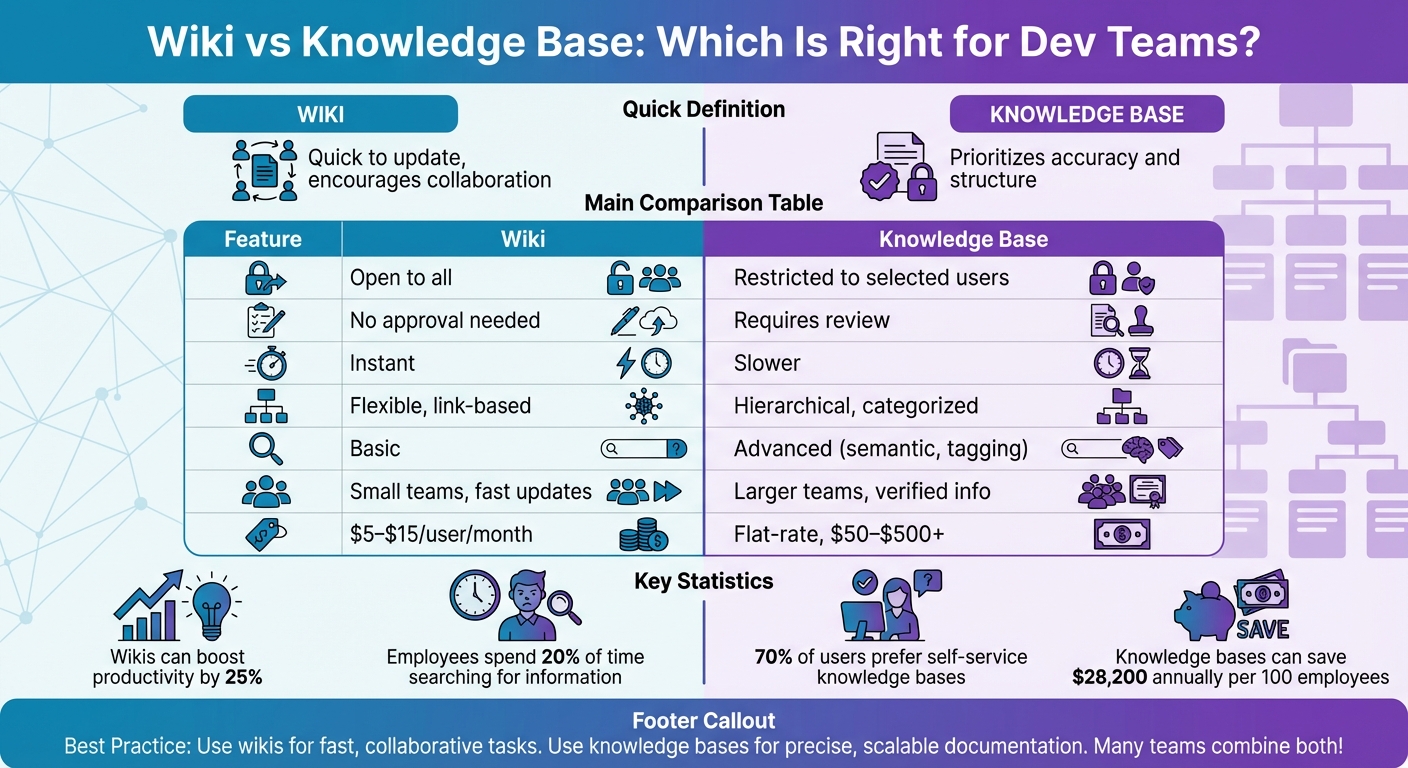
Wiki vs Knowledge Base Comparison for Development Teams
How to Use an Internal Team Wiki or Knowledge Base - Template & Tutorial (Coda)
sbb-itb-1218984
What Is a Wiki for Dev Teams
A wiki is a fast and collaborative platform that allows multiple users to create, edit, and organize content in real time. The term "wiki" comes from the Hawaiian word "wiki wiki", meaning "fast", which perfectly captures the essence of its value for development teams. Unlike systems that require formal approval processes, wikis let any team member contribute or update information immediately. This makes it an adaptable and constantly evolving source of truth for your projects.
For dev teams, wikis serve as flexible, ever-changing workspaces where they can document brainstorming sessions, sprint retrospectives, debugging guides, or infrastructure notes. They usually follow a hierarchical page structure, which allows for infinite subpages. For example, a main "Engineering" page might branch into subpages like "Infrastructure", "API Docs", or "Onboarding."
The collaborative nature of wikis is what sets them apart and makes them so effective.
"People are practicing more knowledge-sharing than ever before, resulting in more transparency and efficiency".
This transparency can lead to a productivity boost of up to 25%. Considering that employees spend about 20% of their time searching for information, wikis become a vital tool for improving how teams access and share knowledge. The following sections dive into the standout features and common use cases that make wikis indispensable for dev teams.
Key Features of Wikis
Wikis empower team members to create or edit content instantly, without waiting for approval. This ease of use - often supported by simple text editors with "slash commands" - encourages developers to document solutions as soon as they emerge.
Version control is another standout feature, providing a complete history of edits. This allows teams to undo changes if needed, promoting experimentation without fear of losing information. Modern wikis also support rich media integration, enabling users to embed code blocks, GitHub gists, diagrams, Figma files, and LaTeX equations. These features enhance technical documentation and make it easier to adapt to evolving project needs. However, the lack of formal gatekeeping can sometimes lead to disorganized content as pages grow organically over time.
Common Use Cases for Dev Teams
Dev teams rely on wikis to document sprint results, retrospectives, and planning notes quickly. They’re also perfect for storing internal technical notes, quick fixes, engineering runbooks, triage rotations, and code style guidelines.
Another key use case is onboarding. New engineers can easily find environment setup instructions, infrastructure maps, and project-specific details in one centralized location. Without a structured system like a wiki, new hires often spend up to 200 hours searching for or recreating lost information. Wikis reduce this inefficiency by making essential knowledge immediately accessible, reinforcing the productivity benefits mentioned earlier. Many teams use templates to maintain consistency and encourage periodic updates - or "drive-by editing" - to ensure pages stay relevant.
What Is a Knowledge Base for Dev Teams
A knowledge base is a centralized hub designed to provide developers with well-organized, reliable content curated by experts. This ensures that the information developers rely on - like API specifications or deployment procedures - is always accurate and up to date.
To keep things simple and efficient, knowledge bases use clear hierarchies, such as Quick References, Runbooks, and Deep Documentation, making it easier to find crucial information. This structure tackles a common workplace issue: employees often spend nearly 20% of their workweek - about one full day - just searching for internal information.
"A knowledge base isn't just about storing information. It's about presenting it in a way that's easy to find, easy to trust, and easy to act on." – Vikas Tiwari, AllyMatter
To maintain quality, knowledge bases enforce strict editing permissions and approval workflows. While this might slow down content creation, it ensures that only accurate and consistent information gets published. This is especially important for compliance documentation, security policies, and production runbooks, where precision is non-negotiable. Let’s dive into the key features that make knowledge bases so effective for development teams.
Key Features of Knowledge Bases
- Restricted Editing: Only approved contributors can make changes, and every edit requires formal approval before publication. This control prevents the chaos that can arise when everyone has editing access, ensuring consistency across all documentation.
- Advanced Search Capabilities: Features like semantic search, tagging, and AI-powered discovery help developers find the exact answers they need - fast. A well-designed system can cut search time by up to 35%. For a company with 100 employees, saving just 20 minutes per week per person could add up to $28,200 in annual productivity gains.
- Traceability and Automated Verification: With detailed change histories, clear authorship, and automated checks for duplicates or outdated content, knowledge bases ensure that documentation stays accurate and dependable, reducing the risk of technical debt.
These features make knowledge bases indispensable in real-world scenarios for development teams.
Common Use Cases for Dev Teams
- API Documentation: Knowledge bases ensure that technical specifications are accurate and up to date, thanks to formal review processes. This helps avoid production issues caused by outdated or incorrect parameters.
- Engineering Runbooks and SOPs: During a production incident - whether it’s the middle of the day or the middle of the night - engineers need incident response procedures they can trust. A knowledge base’s structured and verified content makes it perfect for managing these mission-critical documents.
- Onboarding Guides: Well-organized knowledge bases empower new hires to find answers on their own, speeding up the onboarding process. In fact, about 70% of users prefer self-service options over reaching out to support for help.
With these use cases and features, knowledge bases prove to be a game-changer for development teams, offering both efficiency and reliability.
Key Differences Between Wikis and Knowledge Bases
Both wikis and knowledge bases help teams manage information, but they approach this task in very different ways. These differences lie in how they handle editing permissions, content organization, and search capabilities. For development teams, understanding these distinctions is essential when choosing the right tool for their needs.
The biggest difference between the two systems is in editing control. Wikis allow any team member to make changes immediately, which fosters quick updates but may lead to inconsistent quality. In contrast, knowledge bases limit editing to designated experts, adding a layer of review that ensures accuracy but slows down updates.
"The core difference: wikis emphasize flexibility and collaboration, while knowledge bases prioritize accuracy and control." – Guru
Another major distinction lies in their structure and search functionality. Wikis rely on a flexible, link-based structure and basic keyword searches, which work well for smaller teams or limited documentation. However, as the volume of content grows - say, beyond 200 pages - this simplicity can become a drawback. Knowledge bases, on the other hand, use a carefully planned hierarchy and advanced semantic search, making it easier to navigate large-scale documentation.
The intended audience also sets these tools apart. Wikis are primarily designed for internal teams, fostering collaboration on projects and shared knowledge. Knowledge bases, however, serve a broader audience, catering to internal teams for procedures and policies, as well as external users, such as customers looking for product guides. This dual purpose is a big reason why 91% of organizations use knowledge bases specifically for customer support.
Here’s a quick summary of their differences:
Comparison Table
| Feature | Wiki | Knowledge Base |
|---|---|---|
| Editing Permissions | Open to all team members | Restricted to selected contributors/editors |
| Content Approval | None (immediate publishing) | Required review before going live |
| Update Speed | Very fast (real-time) | Slower (due to review process) |
| Structure | Loose, organic, link-based | Hierarchical, categorized, and planned |
| Search Function | Basic keyword or folder-based | Advanced semantic search with tagging |
| Primary Audience | Internal development/project teams | Both internal teams and customers |
| Maintenance | Crowdsourced, low initial effort | Assigned ownership, higher initial effort |
| Content Quality | Variable; prone to duplication | Consistently high; verified |
In short, wikis prioritize collaboration and speed, while knowledge bases focus on precision and scalability. Each system has its strengths, depending on the team's goals and the audience they aim to serve.
Pros and Cons of Wikis for Dev Teams
Wikis offer a fast and collaborative way to document knowledge in real time, which can boost team productivity. However, understanding their strengths and challenges is essential for choosing the right documentation approach.
Advantages of Wikis
Wikis shine when it comes to speed and accessibility. For example, a developer can document a bug fix at 2 AM without waiting for approvals, ensuring solutions are captured while still fresh. This approach paid off for Adyen, where a Git-based wiki system helped their 600+ engineers reduce onboarding time by 62% (from 16 weeks to 6 weeks) and cut incident resolution time by 28%. These improvements led to an estimated annual productivity boost of over $3.8 million.
Their simplicity also encourages collaboration. With a low barrier to entry, wikis create a space where team members can contribute freely, fostering a shared knowledge base. Shopify's "Documentation Champions" program is a great example - technical wiki contributions increased by 215% in just six months, and the number of engineers blocked by missing documentation dropped by 68%.
Wikis also come with version control and flexibility, making it easy to track changes, roll back edits, and incorporate elements like code blocks or diagrams. Plus, at $5.50 to $15 per user per month, wikis are an affordable option for teams of any size. Despite these strengths, wikis aren't without their challenges.
Disadvantages of Wikis
The openness that makes wikis collaborative can also lead to issues. Without clear governance, content often becomes outdated quickly. In fact, 78% of software engineers cite outdated information as the main reason they distrust internal documentation. Many wikis turn into "graveyards" filled with pages authored by employees who have since left the company.
As wikis grow, search and discovery become major pain points. Developers report spending an average of 6.5 hours per week - nearly 17% of their productive time - searching for information or duplicating work. A staggering 65% say they spend more time searching than reading, and 84% prefer asking colleagues directly over consulting internal wikis.
Another drawback is the disruption caused by context switching. When developers leave their IDE to consult a wiki, it takes an average of 23 minutes to regain focus. For a team of 50 developers, this inefficiency can cost over $1.25 million in productivity losses annually.
"Documentation will never be part of engineering culture until it is integrated into the codebase and workflow." – Riona MacNamara, Google
Pros and Cons Table
| Advantages | Disadvantages |
|---|---|
| Quick, real-time updates without approval delays | Lack of structure leads to disorganization |
| Encourages team-wide contributions | High risk of outdated or inaccurate content |
| Affordable ($5.50–$15/user/month) | Searching becomes harder as the wiki grows |
| Builds a shared knowledge base over time | Ownership ambiguity results in "orphaned" pages |
| Tracks changes with version control | Context switching disrupts focus (23-min recovery) |
| Supports technical content like code blocks and diagrams | Inconsistent quality and style across entries |
Weighing these pros and cons helps teams decide if a wiki aligns with their workflow and documentation needs.
Pros and Cons of Knowledge Bases for Dev Teams
Knowledge bases bring order and reliability to technical documentation, but they require more upfront effort compared to wikis. Weigh these factors carefully to decide if a knowledge base fits your team's needs.
Advantages of Knowledge Bases
Knowledge bases shine in delivering accurate and trusted content. By restricting edits to subject matter experts, they ensure that critical information - like API specs and security protocols - stays reliable. This reliability builds trust, making teams more likely to consult the documentation instead of pinging colleagues on Slack.
Their structured design also makes finding information quick and easy. A well-organized hierarchy paired with advanced search capabilities allows users to locate what they need in under 30 seconds. For a team of 100 employees, saving just 20 minutes a week with efficient knowledge management can lead to $28,200 in annual productivity gains. Scale that up to 1,000 employees, and the savings jump to $282,000 per year.
"A knowledge base isn't just about storing information. It's about presenting it in a way that's easy to find, easy to trust, and easy to act on." – Vikas Tiwari, AllyMatter
Knowledge bases also include governance tools like approval workflows, audit trails, compliance support, and automated reminders to verify content. These features help avoid the "graveyard effect", where outdated documentation piles up. With around 70% of users preferring self-service options when they trust the answers provided, this structured approach ensures documentation remains useful and accessible.
However, these advantages come with some challenges.
Disadvantages of Knowledge Bases
While their structure ensures quality, it can also create bottlenecks. Mandatory review cycles can slow down updates, especially during rapid technical changes, unlike the instant publishing flexibility of wikis. For smaller teams without dedicated documentation staff, this added complexity might feel overwhelming.
Maintenance requirements are another challenge. Keeping a knowledge base effective demands regular pruning, validation, and updates. Without clear ownership, even the best system can fall into disrepair. For instance, when knowledge management fails, new hires spend an average of 200 hours chasing down or recreating lost information.
"The shift from wiki to knowledge base typically happens when documentation quality starts affecting business outcomes: slower onboarding, compliance gaps, or employees repeatedly asking questions that should have clear answers." – Vikas Tiwari, AllyMatter
There's also the issue of user adoption. If searching the knowledge base takes longer than asking a coworker on Slack, people may sidestep the system entirely. To prevent this, knowledge bases need to integrate seamlessly into existing workflows - think ticket templates, chatbots, or browser extensions - so they become the easiest go-to option for answers.
Pros and Cons Table
| Advantages | Disadvantages |
|---|---|
| Expert-verified content ensures accuracy and trust | Review cycles can slow rapid updates |
| Structured categories make information easy to find | Higher maintenance demands with ongoing updates |
| Clear ownership keeps documentation current | May be too complex for smaller teams |
| Governance tools like audit trails and compliance support | Adoption struggles if not integrated into workflows |
| Advanced search capabilities save time | Setup is more complicated than wikis |
| Potential to save $28,200 annually per 100 employees | Requires a shift in mindset to prioritize the knowledge base |
Knowledge bases are most effective when high-quality documentation directly impacts business outcomes, such as faster onboarding or meeting compliance standards.
When to Choose Wikis Over Knowledge Bases
When you weigh the strengths and weaknesses of wikis and knowledge bases, there are times when the simplicity and speed of a wiki make it the better choice for your development team.
Wikis shine when speed is more important than perfection. Imagine a developer fixing a bug at 2 AM or jotting down notes from a sprint retrospective. In these cases, a wiki allows them to publish immediately without waiting for approvals or reviews. This instant-publishing feature is crucial in fast-paced development environments, where delays can lead to lost insights or forgotten details.
Affordability is another key advantage. Wikis typically cost $5–$15 per user per month, making them an attractive option for startups or smaller teams. In contrast, knowledge bases often come with higher flat fees. For teams with fewer than 50 members, wikis offer enough structure without the added complexity or expense of hiring a dedicated content manager. This combination of speed and cost-effectiveness helps teams sustain their momentum without breaking the bank.
"The main advantage is velocity. When your developer solves a tricky bug at 2 AM, they can document it immediately. The knowledge gets captured before it's forgotten." – Zeeshan Khan, Editor-in-Chief, Knowledgebase.net
Wikis are also ideal for work-in-progress documentation, such as brainstorming ideas, engineering runbooks, debugging guides, or project plans. Their flexible, link-based structure allows information to grow and change naturally over time. For teams that need to collaborate without rigid workflows or approval steps, wikis eliminate the barriers that often slow down documentation.
Best Scenarios for Wikis
Wikis are particularly effective in certain situations where their unique strengths come into play.
- Use a wiki for frequent workarounds that need to be documented quickly before developers move on to the next challenge.
- They're perfect for sprint retrospectives and postmortems, where capturing lessons learned while they're fresh is essential.
- Internal FAQs and tribal knowledge thrive in a wiki environment, as anyone can contribute updates without dealing with red tape.
For small teams - especially those with fewer than 20 members - wikis are a great fit. Many platforms offer generous free tiers, and wikis can grow with your team over time. Since everyone contributes as part of their daily tasks, there's no need for a dedicated knowledge manager. However, it's wise to assign someone to periodically review and tidy up the content. Without this oversight, even the most collaborative wikis can turn into outdated "historical artifacts" over time.
When to Choose Knowledge Bases Over Wikis
Wikis are great for quick, flexible collaboration, but when accuracy and accountability are non-negotiable - like in cases of slower onboarding, compliance gaps, or repeated questions - a knowledge base becomes the better choice.
Knowledge bases rely on structured workflows and assigned content owners to ensure updates are reviewed and reliable. This approach is particularly important for teams larger than 50 people, where maintaining trust in documentation becomes harder. For industries like fintech or healthcare, where regulations are strict, knowledge bases offer features like audit trails, version tracking, and detailed permission controls - capabilities that wikis typically lack.
Another standout feature of knowledge bases is their use of AI-driven semantic search, which makes finding relevant information fast, even when the documentation library grows beyond 200 documents. For instance, a 200-person SaaS company reported saving around $15,000 per month by reducing support tickets through a well-maintained knowledge base. This is because knowledge bases act as a centralized repository for critical resources like technical specs and standard operating procedures, ensuring everyone has access to accurate information.
These advantages highlight why a knowledge base often outperforms a wiki, especially for development teams facing complex or high-stakes documentation needs.
Best Scenarios for Knowledge Bases
Knowledge bases shine when teams need a single source of truth for essential documentation. They’re ideal for managing API specifications, system architecture diagrams, security policies, and compliance-related documents - situations where outdated or incorrect information could cause significant issues like production errors or regulatory violations.
They’re also a smart choice for teams scaling beyond 50 members, where informal systems start to falter, and clear ownership of information becomes a necessity. Additionally, knowledge bases integrate well with AI tools, thanks to their structured organization. This makes it easier for AI to retrieve precise information and even flag outdated content or identify gaps where new documentation is needed.
For organizations where about 70% of users prefer solving problems independently rather than reaching out for help, knowledge bases offer the structure and reliability needed to build trust. Features like verification workflows and scheduled audits ensure that the documentation stays accurate, reducing the burden on developers to continuously review and update every page manually.
The Role of Knowledge Plane
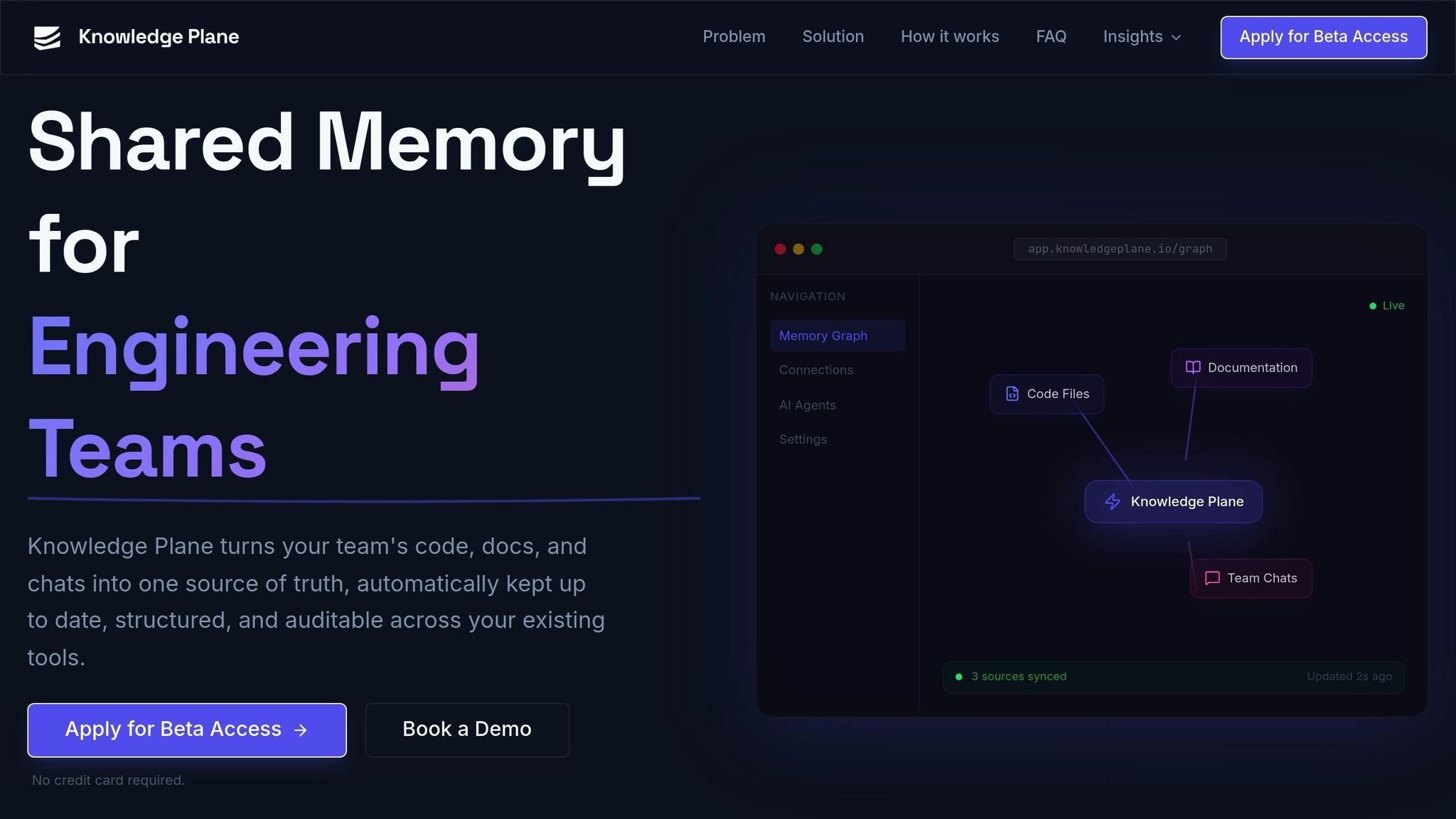
Knowledge Plane takes the concept of a knowledge base further by creating a shared, automatically updated memory for engineering teams. Instead of duplicating information across tools, it connects your code, documents, tickets, and team conversations into a unified system that preserves context across workflows.
This platform uses graph memory, which links technical concepts, ownership details, and dependencies, rather than keeping information in isolated silos. When an expert updates something, the system automatically propagates those changes throughout the platform.
For teams working with AI agents and APIs, Knowledge Plane offers traceable knowledge sources with structured and auditable context. It supports both cloud and self-hosted setups, with workspace isolation to control access. This ensures sensitive information remains secure while staying accessible to the right people. With automatic updates, graph-based linkages, and AI integration, Knowledge Plane is a strong fit for teams that need both precision and scalability without adding extra maintenance overhead.
Combining Wikis and Knowledge Bases in Dev Workflows
Development teams can effectively use both wikis and knowledge bases by understanding their distinct roles and setting clear boundaries. Wikis are ideal for dynamic, collaborative tasks like meeting notes, brainstorming sessions, and project drafts. In contrast, knowledge bases are best for storing verified, reliable information such as API documentation, security policies, and system architecture diagrams.
This distinction solves a major challenge: nearly half (47%) of digital workers struggle to locate the information they need to perform their jobs efficiently. By separating unverified drafts from finalized documentation, a hybrid approach reduces wasted time. Without this division, requiring formal approval for every piece of information could slow teams down significantly. This model ensures that both systems complement each other, maximizing their strengths.
Hybrid Model Benefits
A hybrid model leverages the unique strengths of wikis and knowledge bases to balance speed and accuracy. It creates a clear workflow: wikis serve as a sandbox for brainstorming and evolving ideas, while the knowledge base is reserved for finalized, verified content. As Dave Liao, an Atlassian Admin and Community Leader, explains:
"I use my personal space as a staging area for loose notes that don't yet have a home in a proper space".
The rule of thumb is straightforward: if content requires approval, consistency, or acknowledgment, it belongs in the knowledge base. Everything else can remain in the wiki, enabling faster iteration. This separation also helps reduce context switching, which can cost developers up to 25 minutes of focus with each interruption. Modern hybrid systems integrate seamlessly with tools like Slack, GitHub, and Jira, allowing developers to access verified information directly within their workflows.
The hybrid model also significantly improves onboarding processes. Onboarding often involves chasing down information, which can take up to 200 hours. By combining the speed of wiki-based collaboration with the reliability of a structured knowledge base, new team members can ramp up faster. Wikis handle team-specific notes and evolving details, while the knowledge base provides authoritative technical documentation. This streamlined approach minimizes repeated questions and ensures quicker access to critical information.
Conclusion: Choosing the Right Tool for Your Dev Team
Deciding between a wiki and a knowledge base isn’t about finding the “better” option - it’s about choosing the system that aligns with your team’s needs. For smaller teams with fewer than 50 members, wikis often excel because they prioritize speed and adaptability over rigid structure. However, as organizations grow, the lack of ownership in wikis can lead to disorganized documentation, making a structured knowledge base essential to maintain accuracy and reliability.
The factors to weigh are team size, workflow complexity, and documentation goals. Wikis are ideal for capturing fast-moving, collaborative content like sprint notes, brainstorming ideas, or project updates. On the other hand, if you’re building a dependable resource for API documentation, compliance policies, or customer support, a knowledge base provides the structure and verification your team needs.
As Vikas Tiwari from AllyMatter puts it: “A simple rule I use: if content needs approval, consistency, or acknowledgment, it doesn’t belong in a wiki”. This distinction helps avoid bogging down processes with unnecessary formalities while keeping workflows efficient.
Before committing to a system, take a realistic look at your requirements. Consider whether your content is dynamic or standardized, who your audience is, and whether basic keyword search meets your needs or if semantic search across large volumes of documents is necessary. Running a trial with 2–3 tools using actual team documentation can provide clarity. Keep in mind that wikis generally cost $5–$15 per user per month, while knowledge bases often use flat-rate pricing, ranging from $50 to over $500 monthly.
For many dev teams, the best solution isn’t choosing one tool over the other - it’s using both strategically. Wikis can handle internal drafts and team-specific notes, while knowledge bases store finalized, verified content. This hybrid approach addresses a key challenge: nearly 47% of digital workers report struggling to find the information they need to perform their jobs effectively. The right tool - or combination of tools - can turn documentation from a hurdle into a competitive edge.
FAQs
When should we move from a wiki to a knowledge base?
When your documentation starts feeling unwieldy - too complex, disorganized, or difficult to navigate - it might be time to switch to a knowledge base. While wikis are great for collaborative content creation, they often become messy and harder to manage as they grow. A knowledge base, on the other hand, provides better structure, enhanced search functionality, and scalability. This makes it a perfect fit for teams looking to streamline workflows and manage information more effectively as their needs evolve.
How do we keep a wiki from getting outdated or messy?
To maintain an organized and current wiki, it's essential to establish regular review processes, assign clear ownership for articles, and leverage tools that detect changes. Instead of sticking to rigid schedules, align reviews with actual updates to keep the process efficient. Keep an eye on upstream sources for any changes that might impact your content. Automating reminders and implementing simple review workflows can further streamline the process, helping to ensure your wiki remains accurate and avoids outdated or conflicting information.
What’s the best way to use both a wiki and a knowledge base together?
The most effective approach is to blend the strengths of both tools. Wikis work best for collaborative content that needs regular updates, like onboarding guides or team workflows. Meanwhile, knowledge bases are ideal for structured, dependable resources such as official documentation or support articles. By combining these tools, you create a system that balances dynamic knowledge sharing with accuracy and organization, meeting various team needs and improving overall workflows.