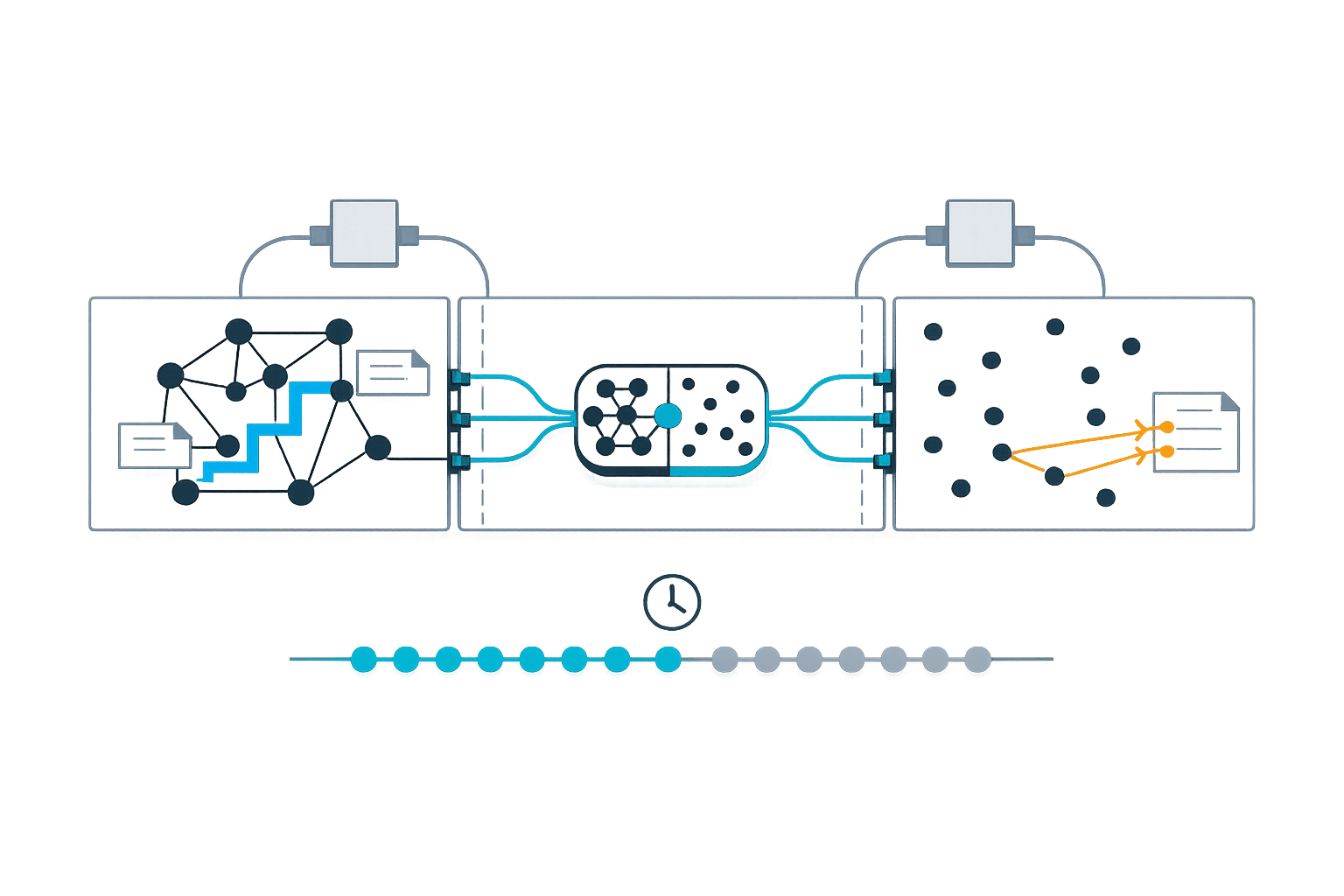
Graph vs Vector Memory in Knowledge Sync
Graph vs Vector Memory in Knowledge Sync
Which memory system is better for AI? It depends on your needs. Graph memory excels at mapping relationships and dependencies, while vector memory is faster for finding semantically similar data. Hybrid systems combine both to maximize benefits.
Key Takeaways:
-
Graph Memory:
- Best for understanding relationships (e.g., "What depends on this service?").
- Higher precision for multi-step queries.
- Slower and more complex to maintain.
-
Vector Memory:
- Great for quick semantic searches (e.g., "Find similar documentation").
- Fast and scalable but struggles with complex logic.
-
Hybrid Systems:
- Combine speed (vector) with precision (graph).
- Ideal for dynamic, interconnected environments.
Quick Comparison:
| Feature | Vector Memory | Graph Memory | Hybrid Setup |
|---|---|---|---|
| Speed | Fast (10–100ms) | Slower (100–300ms) | Moderate (100–300ms) |
| Best Use Case | Semantic search | Relationship queries | Complex environments |
| Maintenance Effort | Low | High | Moderate |
| Accuracy (Multi-Hop) | ~50% | ~80% | ~80–91.4% |
Bottom line: If you need speed, go with vector memory. For detailed reasoning, choose graph memory. For both, opt for a hybrid system.
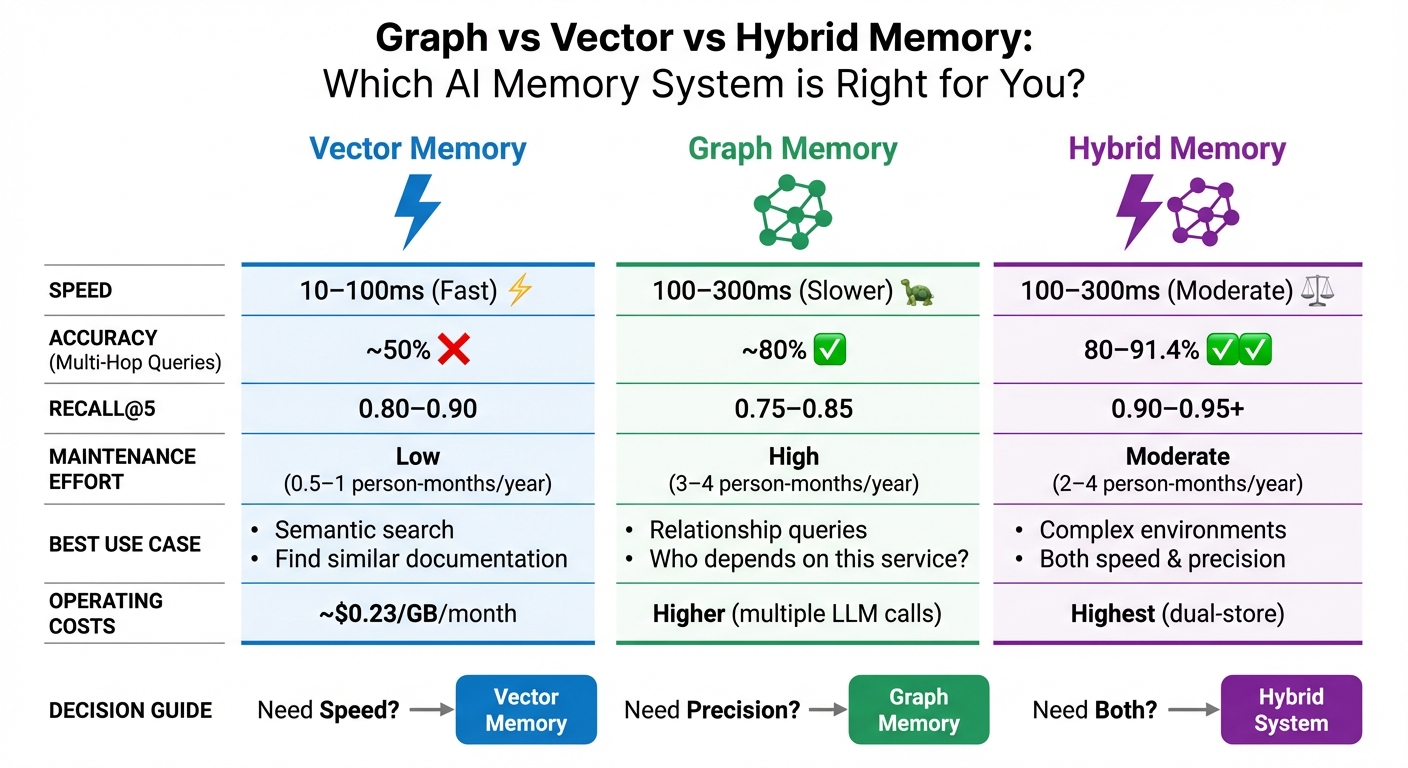
Graph vs Vector vs Hybrid Memory Systems Comparison
Building Scalable AI Memory for Agents Across Graphs and Vectors | Cognee | Vasilije Markovic
sbb-itb-1218984
Graph Memory: Modeling Relationships and Dependencies
Graph memory structures information as a network of nodes and edges, creating a web of interconnected data. This approach reflects the complexity often found in engineering systems, making it ideal for tracking intricate dependencies in real time.
How Graph Memory Works
At its core, graph memory enables AI agents to stay synchronized with constantly changing knowledge. It starts with entity extraction. When new data - like a code commit, ticket update, or team chat - comes in, large language models (LLMs) identify entities and their relationships. These connections are then stored in graph backends such as Neo4j, Memgraph, or AWS Neptune. To process each operation, the system typically requires 2–3 additional LLM calls.
Some implementations go a step further by adding temporal metadata to track changes over time. For example, Zep's temporal knowledge graph includes "valid_from" and "valid_to" timestamps on edges. This allows AI agents to answer questions like "Who was responsible for this service before the migration?".
Strengths of Graph Memory
Graph memory stands out for its ability to handle multi-hop reasoning and provide traceability. It can navigate through multiple connections to answer complex queries, like identifying a manager’s manager, mapping a dependency chain, or determining all services impacted by an API change. As described in the MemoryGraph documentation:
"AI assistant memory isn't just about finding 'similar' content - it's about understanding how knowledge connects".
Unlike vector embeddings, which function as mathematical "black boxes", graph retrieval offers a clear, auditable trail of nodes and edges. This traceability ensures that decisions are grounded in a transparent network of past interactions, which is crucial for maintaining accurate and reliable system knowledge. In tasks requiring complex temporal reasoning, graph-based systems have demonstrated response times up to 90% faster than long-context baseline approaches.
For engineering teams working with interconnected codebases, documentation, and tickets, graph memory is particularly effective at modeling ownership and dependencies. Systems like Knowledge Plane combine graph memory with vector search to help AI agents answer questions such as "Who owns this component?" or "What depends on this library?"
Vector Memory: Fast Semantic Search and Retrieval
Vector memory transforms data into dense numerical embeddings, typically ranging from 384 to 1,536 dimensions. This allows for incredibly fast semantic similarity searches, even across billions of records. This core functionality sets the foundation for understanding how vector memory processes and retrieves information.
How Vector Memory Works
When new data - such as a code comment, documentation update, or chat message - is introduced, it gets converted into a high-dimensional vector. Ninad Pathak explains this process succinctly:
"The key property is that meaning becomes geometry. Related inputs produce vectors that sit nearby in high-dimensional space".
To compare these vectors, distance metrics like Cosine similarity or Euclidean distance are used. Advanced algorithms, such as HNSW (Hierarchical Navigable Small World), make these searches lightning-fast, often completing in milliseconds.
One of vector memory's standout features is its ability to handle approximate matching. Unlike traditional keyword searches, which can stumble over typos or synonyms, vector memory understands that phrases like "bug fix" and "defect resolution" convey similar meanings. Additionally, the cost of ingesting data is relatively low - about $0.0001 per 1,000 tokens for a single embedding call. This is notably more efficient than graph memory, which requires multiple large language model (LLM) calls for tasks like entity extraction.
Strengths of Vector Memory
Thanks to its efficient retrieval capabilities, vector memory shines in both speed and scalability. It can retrieve millions of items within tens of milliseconds, with latency growing at a near-logarithmic rate. Matthew Mayo highlights its practicality:
"Vector databases remain the most practical starting point for general-purpose agent memory because of their ease of deployment and strong semantic matching capabilities".
For engineering teams, vector memory is especially useful for tasks like initial retrieval across extensive documentation, locating similar code snippets, or pulling up relevant past conversations. Systems such as Knowledge Plane combine vector memory with graph structures to identify semantically related information quickly. Once found, graph reasoning can then verify relationships and dependencies. This pairing of vector memory's speed with graph memory's detailed relationship mapping creates a balanced and efficient approach for maintaining up-to-date AI context.
Graph vs Vector Memory for Real-Time Synchronization
In the ongoing conversation about memory models for maintaining AI context, this section dives into the differences in how graph and vector memory handle synchronization. While vector memory prioritizes speed and scalability, graph memory focuses on maintaining precision and structural accuracy.
How Each Memory Type Handles Sync
Vector memory relies on asynchronous upserts and delta syncing to keep its indices updated. This method processes incoming data - like code comments or documentation - by converting it into embeddings and adding it swiftly under an eventual consistency model. This approach keeps retrieval latency low, typically between 10–100ms, though updates to the index are less frequent, potentially causing semantic drift over time.
Graph memory, on the other hand, uses transactional updates with ACID guarantees. It builds connections incrementally by adding edges and nodes, ensuring updates are immediately valid. However, this precision comes at the cost of higher retrieval latency, ranging from 100–300ms, due to the complexity of traversing the graph. Mem0 explains, "Graph memory adds processing time and cost. When you call client.add() with enable_graph=True, Mem0 makes extra LLM calls to extract entities and relationships".
The overhead for graph memory is substantial. Automated synchronization depends on entity extraction powered by LLMs, which can add 500ms to 2 seconds of latency per update. In comparison, explicit storage methods boast write latencies of less than 5ms. Advanced graph systems address this challenge with bi-temporal modeling, which tracks both "valid time" (when an event occurred) and "transaction time" (when the system recorded it). This dual-tracking system allows for managing changing truths without erasing historical data - something flat vector stores struggle to achieve.
Knowledge Plane demonstrates the value of combining these approaches. It uses vector memory for quick semantic retrieval across various sources like code, documentation, and tickets. Then, it applies graph traversal to verify relationships, such as ownership and dependencies, ensuring its AI agents maintain contextual accuracy.
Table: Synchronization Differences
Here’s a quick comparison of how these two memory types handle synchronization:
| Feature | Vector Memory | Graph Memory |
|---|---|---|
| Update Method | Asynchronous Upserts / Delta Syncing | Transactional (ACID) / Incremental Edges |
| Sync Latency | 10–100ms (Retrieval) | 100–300ms (Traversal) |
| Consistency Guarantee | Eventual Consistency | Strong Consistency (ACID) |
| Update Trigger | Data ingestion / Embedding generation | Event-driven (PRs, Slack, Docs) / Entity extraction |
| Reasoning Support | Semantic similarity only | Multi-hop and causal traversal |
| Maintenance Effort | Low (periodic re-embedding) | High (schema updates/completeness checks) |
Hybrid Memory: Combining Graph and Vector
Hybrid memory systems bring together the best of both worlds - blending the speed of vector memory with the precision of graph memory. By integrating these two approaches, hybrid systems address the shortcomings of standalone methods, making them highly effective for real-time AI applications.
Why Hybrid Memory Works
Standalone memory systems have their limits. Vector memory is great for quickly retrieving information based on semantic similarity, but it struggles with complex, multi-step queries like "Who is my teammate's manager?" On the flip side, graph memory excels at handling these kinds of relationship-based queries by traversing connections between nodes. However, it’s not as fast when it comes to broader semantic searches.
Hybrid memory bridges this gap. Here’s how it works: when a query is made, the system first uses vector memory to perform a quick semantic search and identify relevant nodes. Then, it leverages graph memory to explore the relationships between those nodes and construct a complete answer. This approach has shown impressive results - hybrid GraphRAG systems, for instance, achieve around 80% accuracy, with precision improvements exceeding 35% in benchmarks.
A real-world example of this is Cedars-Sinai’s Alzheimer's Disease Knowledge Base (AlzKB), implemented in September 2025. The system used a graph database to store biomedical entities like genes and drugs, enabling complex reasoning, while a vector database processed natural language queries. This hybrid setup identified two FDA-approved drugs, Temazepam and Ibuprofen, as potential treatments for Alzheimer's. Similarly, Precina Health combined Memgraph and Qdrant to tackle Type 2 diabetes care. Qdrant handled fast semantic searches, while the knowledge graph uncovered intricate relationships between patient behaviors and medical outcomes.
Another example is Knowledge Plane, which supports engineering teams by combining vector memory for quick searches across code, documentation, and tickets with graph traversal to verify dependencies and relationships. This ensures AI agents maintain contextual accuracy while keeping response times fast enough for real-time use.
Table: Performance Across Memory Models
The table below highlights the trade-offs between vector-only, graph-only, and hybrid memory setups:
| Metric | Vector-Only | Graph-Only | Hybrid Setup |
|---|---|---|---|
| RAM Efficiency | High (Optimized for dense vectors) | Moderate (Relational overhead) | Moderate to Low (Dual-store) |
| Recall@5 | 0.80–0.90 | 0.75–0.85 | 0.90–0.95+ |
| Latency (P95) | 20–100ms | 100–300ms | 100–300ms |
| Energy/Compute Use | Low (Single embedding) | High (Multiple LLM extractions) | High (Combined processing) |
| Accuracy (Multi-hop) | ~50% | ~80% | ~80–91.4% |
While hybrid systems demand more computational resources and maintenance - estimated at 2 to 4 person-months annually versus 0.5 to 1 person-month for vector-only systems - the accuracy gains can make the extra effort worthwhile for teams managing complex, interconnected knowledge.
Choosing Between Graph, Vector, or Hybrid Memory
Selecting the right memory model depends on your team's specific query needs and their ability to maintain the system. Here's a quick guide to help match memory types with your team's real-world questions and operational requirements.
Decision Guide for Engineering Teams
For straightforward semantic queries (like finding related documentation or code snippets), go with vector memory:
- Query latency: 10–100 ms
- Operating costs: Around $0.23 per GB per month
- Maintenance: Requires 0.5–1 person-month annually
- Best suited for: Questions like "Find documentation similar to this" or "What code snippets relate to authentication?"
Choose graph memory when understanding specific relationships (like team hierarchies or dependency chains) is essential:
- Performance: Achieves 92% recall and 88% precision compared to standard RAG's 85% recall and 75% precision
- Query latency: 100–300 ms
- Maintenance: Needs 3–4 person-months per year
- Best suited for: Queries such as "Who reports to Emma's manager?" or "Which services depend on the authentication module?"
Opt for a hybrid approach in complex, dynamic environments:
- Accuracy: Delivers 80% on multi-hop queries versus 50% for vector-only systems
- Maintenance: Requires 2–4 person-months annually
- Example use case: Systems like Knowledge Plane combine vector memory for fast semantic searches (across code, docs, and tickets) with graph traversal for verifying dependencies and ownership chains.
For scenarios involving frequent updates and time-sensitive data:
- Use temporal knowledge graphs to track ownership changes or evolving dependencies. For example, Zep systems report a 90% reduction in response latency for complex temporal reasoning.
- Handle intensive tasks like fact extraction, entity resolution, and graph construction during write-time to ensure quick retrieval.
- Aim for propagation times of under 5 minutes from source changes (e.g., a GitHub PR merge) to an updated and searchable memory.
- Include human checkpoints to review critical data changes for added reliability.
"Reliable multi-agent systems are mostly a memory design problem."
The key is to align your memory model with the need for synchronized, auditable information across your team's codebase, documentation, tickets, and communication channels.
Conclusion: Graph vs Vector Memory
Both memory models serve distinct purposes in keeping AI context aligned for engineering teams, each with its own advantages and trade-offs.
Vector memory excels at rapid semantic searches, completing queries in under 100 milliseconds. However, it struggles with multi-hop reasoning and lacks the ability to incorporate temporal context, which is crucial for tracking dependencies.
Graph memory, on the other hand, is designed to meticulously map relationships that vector systems often overlook. It achieves higher recall and precision compared to vector-only methods. Additionally, temporal knowledge graphs can cut response times for complex reasoning tasks by as much as 90%. The downside? Graph systems come with added complexity, requiring entity extraction pipelines and predefined schemas.
"Vector databases remain the most practical starting point... but as we push toward autonomous agents... graph RAG emerges as a critical unlock." – Matthew Mayo, Managing Editor, MachineLearningMastery.com
Hybrid systems offer a balanced solution, leveraging the speed of vector memory for semantic retrieval and the depth of graph traversal for verifying relationships and dependencies. For example, Knowledge Plane's hybrid approach synchronizes graph and vector memory via scheduled Skills, improving multi-hop query accuracy from 50% (vector-only) to approximately 80%. This enables AI agents to efficiently handle both "Find similar authentication code" (vector) and "Which services depend on this module?" (graph) queries, all while maintaining accurate, up-to-date context across codebases, documentation, tickets, and team communications.
Ultimately, the best choice depends on your team's specific needs and resources. Vector memory is a great starting point for semantic search. Incorporate graph memory when relationship tracking becomes a priority, or opt for a hybrid system if you need both capabilities - especially in fast-paced environments where context must remain current and verifiable across multiple platforms.
FAQs
When should I add graph memory on top of vector search?
When your AI system needs to manage complex relationships, multi-hop reasoning, or structured entities, especially in workflows or organizational setups, consider adding graph memory. While vector search is excellent at identifying semantically similar data, graph memory shines in reasoning over explicit connections, such as ownership or dependencies. This capability allows for more precise and context-aware decision-making in scenarios that rely heavily on structured knowledge.
How do you keep memory synced with fast-changing code and docs?
To keep memory aligned with fast-evolving code and documentation, real-time, event-driven updates and organized memory management are essential. By actively pulling updates from tools like Confluence or GitHub, the AI ensures its context remains current. Leveraging graph and vector memory allows it to analyze relationships and dependencies effectively, minimizing outdated responses and enhancing the accuracy of its decisions.
What’s the simplest way to build a hybrid graph+vector setup?
To create a hybrid graph+vector system, integrate vector embeddings for semantic search with a knowledge graph to handle explicit relationships. This setup relies on a dual-store system, where data is synchronized across both layers. A controller manages updates and queries, ensuring everything stays up-to-date. This combination allows for quick semantic retrieval while retaining structured data on relationships, helping AI maintain context and reason through connections efficiently.